

To allow or block an AI crawler, add a User-agent group for its exact name to your robots.txt file, with Allow: / to let it in or Disallow: / to keep it out. The important decision comes first: some AI bots collect pages to train models, others fetch pages so an assistant can cite you in an answer, and most businesses want to treat those two groups differently.
This guide lists the main AI crawlers by job, gives robots.txt rules you can copy, and covers the part that catches most sites out: firewalls and bot protection that block AI search bots no matter what robots.txt says. User agent names below were checked against each company’s own documentation in November 2026. They change, so check again before you rely on a rule.
Training crawlers vs search crawlers
Each AI company now runs more than one bot. They fall into three groups, plus a few control tokens that are not crawlers at all:
| Job | What it means for you | Examples |
|---|---|---|
| Training | Your pages may be used to train future models. Blocking it is an opt-out from training. | GPTBot, ClaudeBot, CCBot |
| Search and indexing | The assistant’s search index. Blocking it means the assistant can’t find or cite your pages when people ask questions. | OAI-SearchBot, Claude-SearchBot, PerplexityBot |
| User-triggered fetches | A person asked the assistant something and it opened your page to answer. | ChatGPT-User, Claude-User, Perplexity-User |
| Control tokens | Not separate crawlers. They tell a company how it may use pages its main crawler already fetched. | Google-Extended, Applebot-Extended |
For a local business, a shop or a B2B service, the search group is the one that brings customers. If ChatGPT search can’t read your service pages, it answers “who does slab leak repair in Austin” from directories and competitors instead. The training group is a separate choice about how your content is used, and either answer is reasonable.
The user agent names
OpenAI
From OpenAI’s crawler documentation:
- GPTBot: crawls content that may be used to train OpenAI’s foundation models. Disallowing it opts you out of training.
- OAI-SearchBot: surfaces websites in ChatGPT’s search features. If you block it, your pages won’t appear in ChatGPT search answers (they may still show as plain navigational links).
- ChatGPT-User: visits made because a user asked ChatGPT or a custom GPT to open a page. OpenAI says robots.txt rules may not apply to these, since a person started them, and that ChatGPT-User is not used to decide what appears in search. Use OAI-SearchBot rules for search visibility.
- OAI-AdsBot: checks landing pages submitted as ads on ChatGPT. It only visits submitted ad pages.
OpenAI says changes to robots.txt can take about 24 hours to show in its search results.
Anthropic
From Anthropic’s help article on its crawlers:
- ClaudeBot: collects web content that could help train Anthropic’s models.
- Claude-SearchBot: crawls to improve Claude’s search results.
- Claude-User: fetches pages when a Claude user asks a question that needs them.
Anthropic says its bots follow standard robots.txt directives and also support Crawl-delay. It also says blocking IP addresses is not a reliable opt-out, so use robots.txt.
Perplexity
- PerplexityBot: indexes sites so they can appear and be linked in Perplexity’s answers. Perplexity says it is not used to train foundation models.
- Perplexity-User: fetches a page when a user’s question needs it. Perplexity says this fetcher generally ignores robots.txt, because a person asked for it.
Google’s list of common crawlers explains the part people most often get wrong:
- Googlebot crawls for Google Search, and Google Search includes AI Overviews and AI Mode. There is no separate AI Overviews crawler.
- Google-Extended is a control token, not a crawler. It controls whether content Google has crawled is used to train Gemini models and for grounding in Gemini Apps and Vertex AI. Google says it does not affect inclusion or ranking in Google Search, and it does not control AI Overviews.
So blocking Google-Extended keeps you in Google Search and AI Overviews. Blocking Googlebot removes you from both. Our guide on showing up in Google AI Overviews covers the controls that do apply there.
Others worth knowing
- Applebot powers Apple’s search features (Spotlight, Siri, Safari). Applebot-Extended does not crawl; disallowing it opts your content out of training Apple’s foundation models without affecting Apple search.
- CCBot is Common Crawl’s crawler. Its open archive is widely used to train models.
Robots.txt you can copy
Robots.txt lives at the root of your domain (https://example.com/robots.txt). A crawler uses the most specific User-agent group that matches it, so a bot named in its own group ignores the User-agent: * group. More on the file in our robots.txt entry.
Allow everything (the default)
If your robots.txt has no rules for AI bots and nothing blocks them under User-agent: *, they are already allowed. You don’t need to list them. Being explicit does no harm, though, and makes the intent clear to the next person who edits the file.
Allow AI search, opt out of training
This is the setup we use most often on client sites:
# AI search and assistants: allowed
User-agent: OAI-SearchBot
User-agent: ChatGPT-User
User-agent: Claude-SearchBot
User-agent: Claude-User
User-agent: PerplexityBot
Allow: /

# Model training: opted out
User-agent: GPTBot
User-agent: ClaudeBot
User-agent: CCBot
User-agent: Google-Extended
User-agent: Applebot-Extended
Disallow: /

# Everyone else
User-agent: *
Disallow: /wp-admin/
Allow: /wp-admin/admin-ajax.php

Sitemap: https://example.com/sitemap.xml
Several User-agent lines in a row share the rules beneath them. Googlebot is not named, so it follows the * group and can crawl normally.
Block one folder from AI bots only
If you have a members area or paid guides you don’t want in AI answers:
User-agent: OAI-SearchBot
User-agent: Claude-SearchBot
User-agent: PerplexityBot
Disallow: /members/
Remember that robots.txt is a request, not a lock. Anything private should be behind a login.
Step by step
- Open your current robots.txt and look for a site-wide
Disallow: /, or groups that already name AI bots. Old SEO plugin presets sometimes added blanket AI blocks. - Decide per group: search bots yes or no, training bots yes or no. Write it down so the decision survives the next developer.
- Edit the file. On WordPress, Rank Math and Yoast both have a robots.txt editor, or you can edit the physical file. RankThat’s free WordPress Bridge plugin can also apply AI crawler access in robots.txt as a fix you review first, with one-click undo. On sites without WordPress whose domain uses Cloudflare, RankThat’s Cloudflare Worker can serve robots.txt rules that allow AI crawlers.
- Test it. The free AI Crawler Checker shows which AI bots your robots.txt allows or blocks. The robots.txt checker tests a specific URL against the rules.
- Check the firewall (next section). This is where most real blocks are.
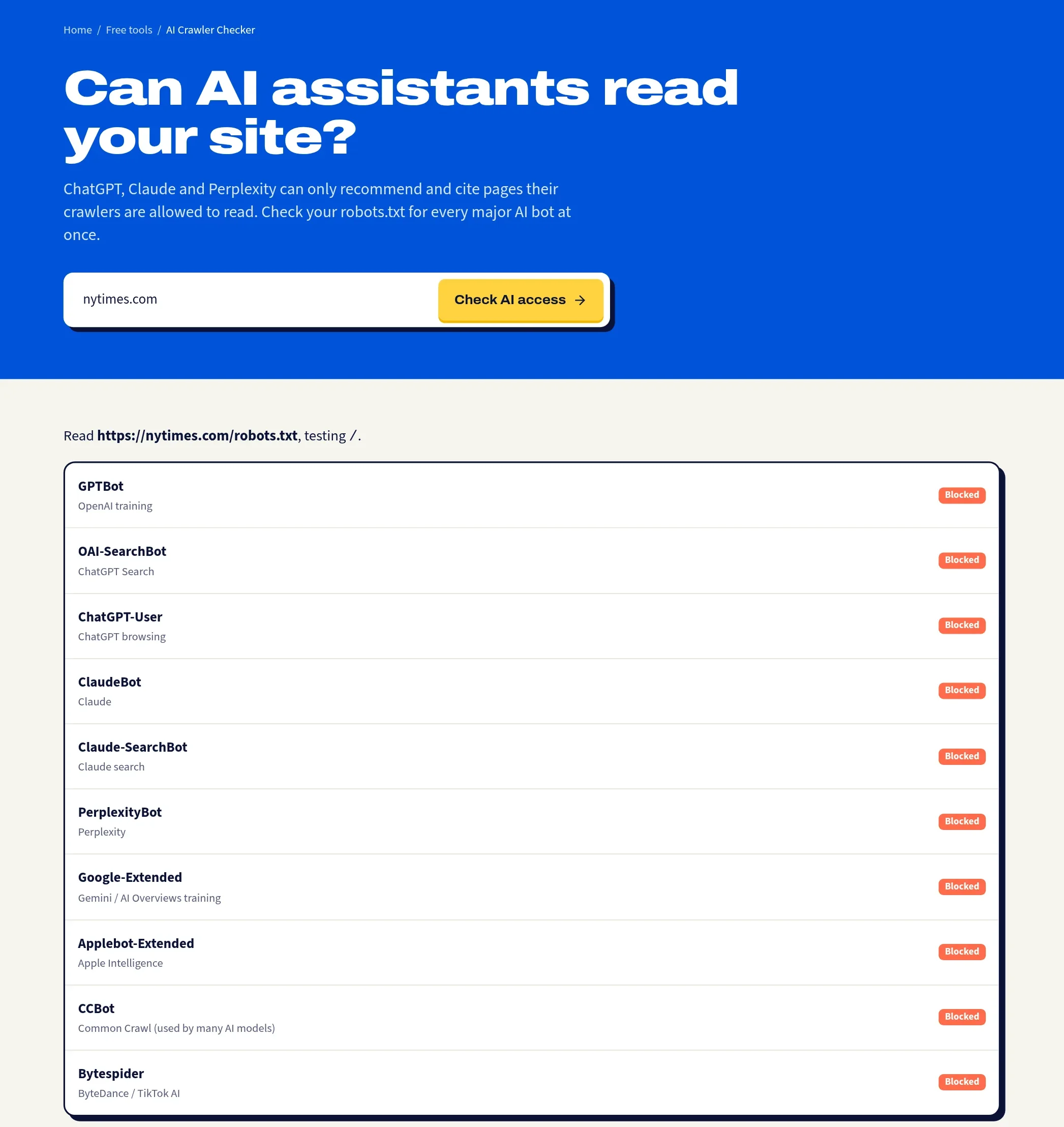 RankThat’s free AI Crawler Checker on a news site that blocks every major AI bot, the search bots included. Try it on your own site.
The firewall problem
Robots.txt only matters if the bot can reach your site. Many hosts, CDNs and security plugins now block or challenge automated visitors, and some have a one-click “block AI bots” setting. When that is on, OAI-SearchBot and PerplexityBot get a 403 or a challenge page, whatever your robots.txt says.
Signs this is happening:
- Your robots.txt allows the bots but ChatGPT or Perplexity never cite your pages, even for questions about your own business.
- Server or CDN logs show AI bot requests answered with 403 or 503 status codes.
- Your hosting dashboard has a “bot fight”, “AI scrapers” or similar toggle turned on.
The fix is to allow the verified search bots in the firewall rather than turning protection off. Most CDNs let you allow known bots by category. OpenAI and others publish IP ranges you can use to confirm a request is genuine, since anyone can fake a user agent.
RankThat’s Site Audit flags robots.txt rules that block AI search crawlers, and warns when bot protection challenged parts of the audit, which is often a sign AI bots are blocked too.
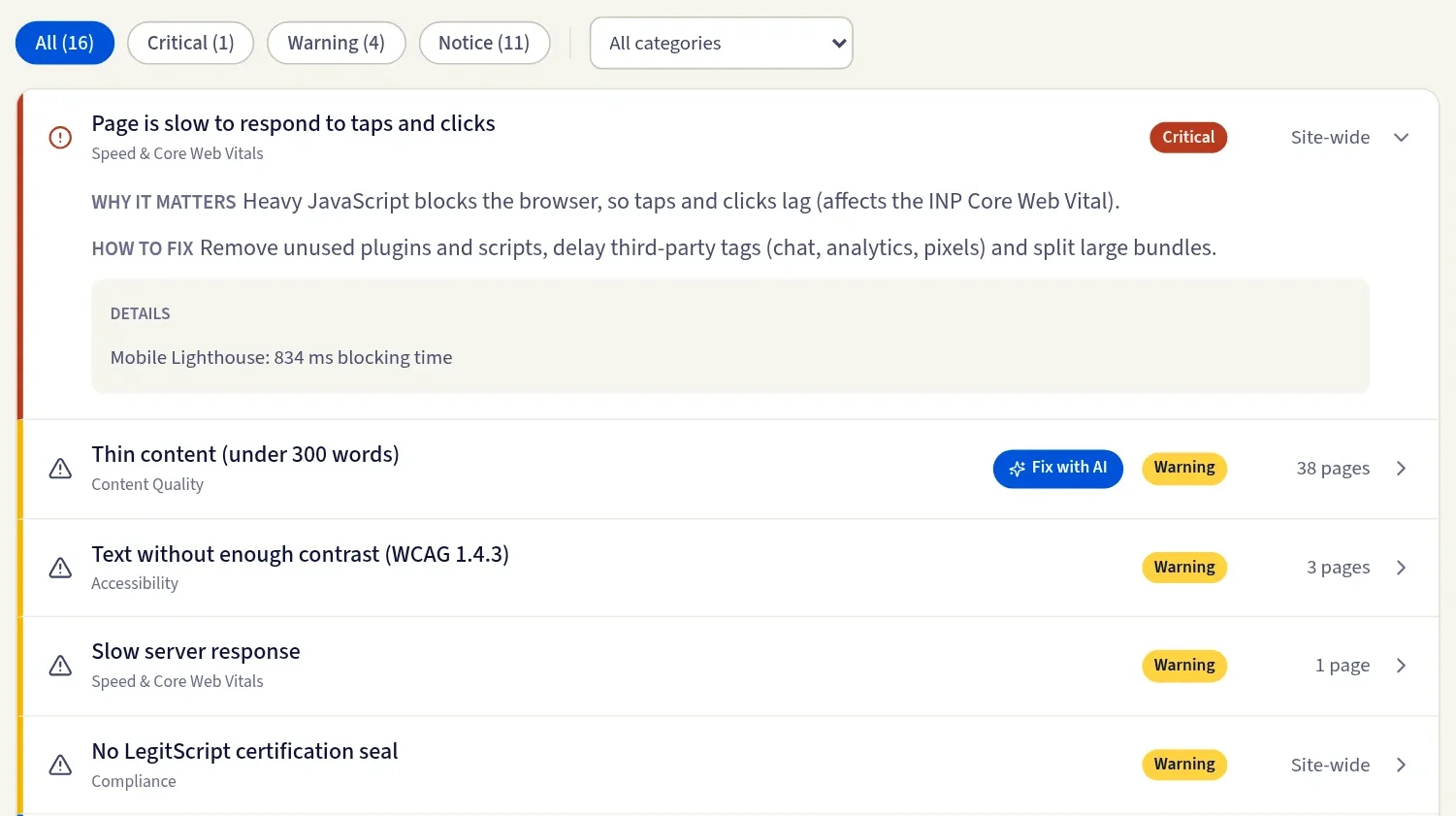 The issues list in RankThat’s Site Audit. AI crawler blocks appear with the other crawlability issues, each with why it matters and how to fix it.
What robots.txt can’t do
- It doesn’t remove content already collected. Blocking GPTBot today stops future crawling, not past training.
- It doesn’t stop user-triggered fetches everywhere. OpenAI and Perplexity both say their user-triggered fetchers may not follow robots.txt.
- It doesn’t control Google AI Overviews separately. That needs snippet controls such as
nosnippet, which also affect normal results. A page-levelnoindexor an X-Robots-Tag header removes the page from Google entirely. - llms.txt is not an access control. An llms.txt file gives AI tools a summary of your site. It does not grant or block anything.
After you change access, track whether it makes a difference. RankThat’s AI Visibility checks whether ChatGPT, Gemini, Perplexity, Claude and Google AI Overviews mention or cite you for the questions you choose. The AI search readiness checklist covers the rest of the work.
FAQ
Does blocking GPTBot remove me from ChatGPT search?
No. GPTBot is the training crawler. ChatGPT search uses OAI-SearchBot. You can block GPTBot and still allow OAI-SearchBot.
Does blocking Google-Extended hurt my Google rankings?
No. Google says Google-Extended does not affect inclusion or ranking in Google Search, and it doesn’t control AI Overviews.
Should a small business block AI training bots?
It is a judgment call. Training opt-outs don’t affect whether assistants can cite you in search answers, as long as you allow their search bots. Many service businesses allow everything because their pages are marketing anyway.
How long until a robots.txt change takes effect?
Most crawlers cache robots.txt and re-read it within about a day. OpenAI says about 24 hours for its search results. Reaching new answers can take longer, because the pages still need to be crawled.
Can I check which AI bots visit my site?
Yes, in your server or CDN access logs. Filter by user agent, and confirm important bots against the company’s published IP ranges.