

To show up in Google AI Overviews, a page has to be indexed in Google and eligible to show a snippet in normal search results. Google says there are no extra technical requirements and no special optimizations for AI Overviews or AI Mode, so the work is good SEO done thoroughly: pages Google can crawl, content that answers the question clearly, and a business Google can recognize and trust.
That sounds like a non-answer, but it is useful. It tells you to ignore anyone selling an “AI Overview schema” or a secret file, and to spend the time on the things that decide which pages get used as sources. This guide covers what Google has said, how AI Overviews pick their links, and the practical checks we run on client sites. The example is Coastline Plumbing, a fictional plumber in Austin, Texas.
What Google says about AI Overviews
Google’s Search Central page AI features and your website is the source to trust here. The main points:
- No additional requirements. A page needs to be indexed and eligible to appear in Google Search with a snippet. That is all. Being eligible does not guarantee it will be shown.
- No special files or markup. Google says you do not need new machine-readable files, AI text files or special schema.org markup to appear. An llms.txt file does nothing for AI Overviews.
- The usual controls apply.
nosnippet,data-nosnippet,max-snippetandnoindexlimit what Google can show from your pages, in AI features too. Googlebot’s rules in robots.txt control crawling for Search, including AI features. - Google-Extended is not the switch. Blocking the Google-Extended token limits use in some of Google’s other AI systems. It does not control AI Overviews or AI Mode.
- Traffic is counted with normal search. Clicks and impressions from AI Overviews and AI Mode are included in Search Console’s Performance report under the “Web” search type. There is no separate AI Overviews filter.
The same page lists Google’s recommended practices: allow crawling (including through your CDN or host), make pages findable through internal links, keep important content in text, support it with good images and video, give a good page experience, keep Business Profile and Merchant Center information current, and make the structured data match what is visible on the page.
How AI Overviews choose their sources
AI Overviews are built from Google’s own search index. Google also describes a technique called query fan-out: the system runs several related searches across subtopics, then pulls supporting links from the results. A question like “why is my water heater making a popping noise” might fan out into searches on sediment buildup, flushing a tank, and when to replace a heater.
Two things follow from that:
- You can be cited without ranking first for the main query. If your page is the clearest answer to one of the sub-questions, it can be a supporting link.
- Thin pages that cover one phrase lose to pages that cover the topic. A page that answers the main question and the obvious follow-ups is useful for more of those fan-out searches.
This is the same logic as semantic SEO: write about the topic and the things people associate with it (the entities), not one keyword repeated.
Step 1: Make sure the page can be used at all
Most “why aren’t we in AI Overviews” questions we get end here. Check, in this order:
- Is the page indexed? Run it through URL Inspection in Google Search Console. If it says the URL is not on Google, nothing else matters yet.
- Can Googlebot crawl it? A firewall or bot-protection setting that challenges unknown visitors sometimes catches Googlebot as well. URL Inspection’s live test shows the page Google actually received.
- Is a snippet allowed? Search the page source for
nosnippetandmax-snippet. We have seen themes addmax-snippet:0site-wide, which removes the page from snippets and AI Overviews alike. - Is the answer in the HTML as text? Prices in an image, opening hours in a PDF or an answer hidden behind a “load more” script are harder to use. Put the key facts in plain text on the page.
Step 2: Answer the question in the first lines
AI Overviews quote or summarize short passages. Pages that put the answer near the top, in plain sentences, are easier to use than pages that open with three paragraphs about the company.
For Coastline Plumbing’s water heater page, the old opening was a welcome message. The new one reads:
A popping or rumbling water heater usually has sediment on the bottom of the tank. Flushing the tank often fixes it. If the heater is over 10 years old or the noise comes back within weeks, replacement is usually cheaper than repeated repairs.
That passage answers the question, names the cause and gives the next step. The rest of the page then covers flushing, costs and warning signs under clear headings.
Practical rules:
- Use headings that match real questions. “How long does a water heater last?” is better than “Longevity”.
- Answer, then explain. One or two direct sentences under each heading, then the detail.
- Use lists and tables for steps and comparisons. They are easy to lift and easy to read.
- Look at People Also Ask for the query. Those questions are a good map of the follow-ups worth covering.
Step 3: Cover the topic, not one phrase
Search the main question and look at what the AI Overview already says and which sites it links to. Then compare your page:
| Check | What to look for |
|---|---|
| Sub-questions | Which follow-ups does the overview cover that your page skips? |
| Specifics | Does your page give real numbers, timeframes, local details, named products? |
| Freshness | Are prices, rules and dates current? |
| Format | Does a table or list explain it faster than your paragraphs? |
| Proof | Photos of real work, named staff, licenses, reviews |
Adding what is missing usually helps the page in normal results too. AI Overviews draw on the same index and ranking systems as regular results, so a page that does well there is in a good position to be used.
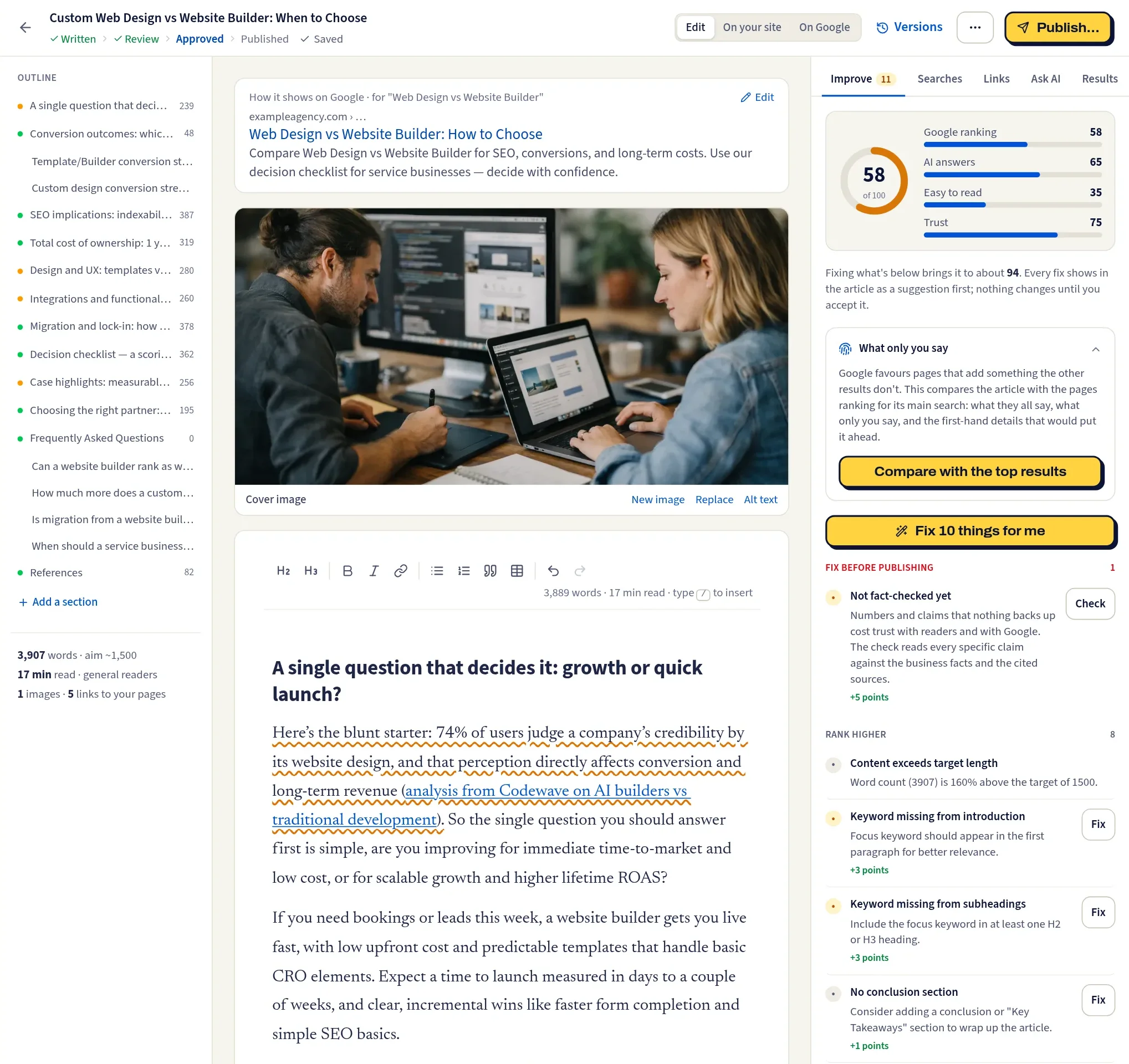 The article editor in RankThat. The coach scores the draft for Google, AI answers, readability and trust, and lists what to fix before it goes live.
Step 4: Show experience and trust
Google’s guidance on helpful content and E-E-A-T applies to AI Overviews because they use the same ranking systems. On a local service site that means:
- An about page with real people, licenses and years in business.
- Author or reviewer names on advice pages, with a short bio.
- Real photos instead of stock images.
- Specific examples from your own jobs (“in houses built before 1960 in central Austin we often find galvanized supply lines”).
Mentions of your business on other trusted sites matter as well. Brand mentions, even unlinked ones, help Google connect your name with the topic.
Step 5: Keep your business details consistent
For local and product questions, AI Overviews often combine web pages with Google’s own data. Keep your Google Business Profile accurate (hours, categories, services, phone), and if you sell products, keep Merchant Center feeds current. Use Organization or LocalBusiness structured data that matches the visible details on your site: same name, same phone, same address. It does not earn a special AI placement, but it removes doubt about who you are.
Step 6: Track it
Search Console will not tell you when a page appears in an AI Overview, because those clicks are counted inside normal web results. You have two options:
- Manual checks. Search your main questions in a private window every few weeks and note which sites are linked. AI Overviews vary by location, device and time, so one check is a sample, not a measurement.
- Tracking tools. RankThat’s AI Visibility checks whether Google AI Overviews, ChatGPT, Gemini, Perplexity and Claude mention or cite your business for the questions you choose, and compares you with competitors.
If you want a wider list of checks across ChatGPT, Gemini and AI Overviews, use the AI search readiness checklist. Our guide on getting recommended by ChatGPT covers the parts that differ for assistants outside Google.
Mistakes we see
- Chasing AI-specific tricks. Special schema, “AI-friendly” plugins and llms.txt files do not change AI Overviews. Google has said so directly.
- Blocking Google-Extended and expecting it to remove you from AI Overviews. It does not. Only Googlebot rules and snippet controls do that, and they affect normal search as well.
- Writing for the overview instead of the reader. Pages stuffed with one-line answers and no substance are less useful, and they rarely rank.
- Expecting the same clicks. An AI Overview can answer simple questions without a click, the same pattern as zero-click searches. Pages that give a reason to click (prices, booking, local detail, tools) hold up better.
- Ignoring the basics. A slow, unindexed or noindexed page will not appear, however good the writing.
FAQ
Do I need special schema to appear in AI Overviews?
No. Google says no special schema.org markup is needed. Structured data still helps Google understand your pages and must match the visible content, but there is no AI Overview type.
Can I opt out of AI Overviews without leaving Google Search?
Only partly. nosnippet, data-nosnippet and max-snippet limit what Google can quote, which affects AI Overviews and normal snippets together. Blocking Google-Extended does not remove you from AI Overviews.
How do I see AI Overview traffic in Search Console?
You can’t separate it. Google counts it within the Performance report’s “Web” search type, together with normal results. Use a tracker or manual checks to see when you are cited.
Does ranking on page one guarantee a citation?
No. AI Overviews pull from several searches and pick passages that answer the question. Ranking well makes a citation more likely, but a clear answer to a sub-question can be cited from lower positions.
How long does it take to appear after changes?
Google has to recrawl and reprocess the page first, which can take days or weeks. Request indexing in URL Inspection after a big change, then check again over the following weeks.