

To be ready for AI search, a site needs four things: AI crawlers can reach it, the business behind it is described clearly and consistently, the pages say something specific enough to quote, and someone checks whether ChatGPT, Gemini, Perplexity and Google AI Overviews actually mention it. This checklist covers each of those in the order we work through them on client sites.
Most of it is ordinary good SEO. Google says there is nothing extra you need to do to appear in AI Overviews or AI Mode beyond being indexed and eligible for a snippet (Google Search Central: AI features and your website). The other assistants work differently, though, and that is where sites slip.
The example is Coastline Plumbing, a fictional plumbing company in Austin, Texas.
1. Crawler access
If an assistant’s crawler cannot fetch your pages, it cannot cite them. This is the most common blocker we find, and it is usually a firewall setting nobody remembers turning on.
| Check | Why it matters | Check it with |
|---|---|---|
| Pages return 200 to Googlebot and are indexed | AI Overviews and AI Mode draw on Google’s index | URL Inspection in Search Console |
| robots.txt does not block OAI-SearchBot (ChatGPT search) | Blocked pages can’t appear as ChatGPT search sources | robots.txt report in Search Console |
| PerplexityBot and Claude-SearchBot are allowed if you want those answers | Each assistant has its own crawler and its own rules | AI crawler checker |
| Bingbot is allowed | Copilot and several other assistants lean on Bing’s index | Bing Webmaster Tools |
| Your CDN or security plugin does not return 403 or a challenge page to these bots | robots.txt can say “allow” while the firewall still says “no” | AI crawler checker, server logs |
| You have decided on training crawlers (GPTBot, ClaudeBot, Google-Extended) separately | Blocking training is a business choice and is separate from appearing in search answers | Your robots.txt |
A note on Google-Extended: it controls whether your content is used for Gemini model training and grounding. Google says it does not affect your inclusion in Google Search, and AI Overviews use the normal Googlebot crawl. Blocking Google-Extended will not keep you out of AI Overviews; nosnippet would, and it would also strip your normal snippets.
For background on the bots and what each one does, see AI crawlers.
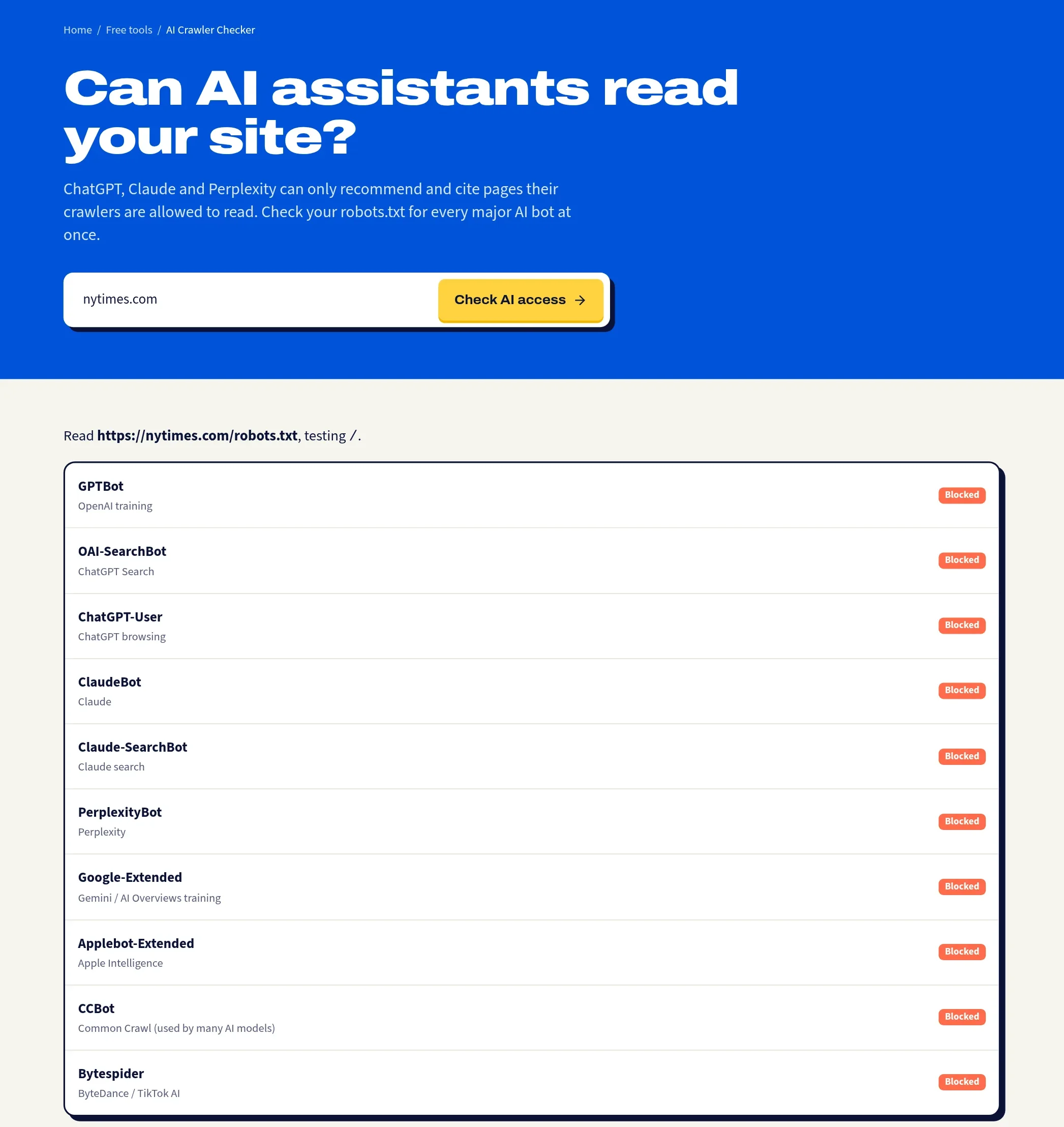 RankThat’s free AI Crawler Checker on a news site that blocks every major AI bot, the search bots included. Try it on your own site.
2. llms.txt and machine-readable basics
| Check | Why it matters | Check it with |
|---|---|---|
| Decide whether to add an llms.txt file | A short Markdown summary of your site for AI tools. Cheap to add, low priority | A text editor, or the free generator on our tools page |
| If you add one, list your real money pages with one-line descriptions | A file that lists your tag archives helps nobody | Open yoursite.com/llms.txt |
| XML sitemap is current and submitted | Crawlers of every kind find new pages faster | Sitemaps report in Search Console |
| Important text is in the HTML, not only loaded by JavaScript | Many AI crawlers do not run JavaScript | View source, or fetch the page with JavaScript off |
Be honest with yourself about llms.txt: it is a proposal, not a standard the big engines have committed to. We add it because it takes ten minutes, then move on. The JavaScript point is more important. Several AI crawlers fetch the raw HTML and stop there, so a service page built entirely in client-side JavaScript can look empty to them.
3. Entity and organization information
AI assistants answer questions about businesses by working out which real-world thing a page is about. In SEO terms that thing is an entity. The clearer and more consistent your business is described across the web, the more confidently an assistant can name you.
- One name, everywhere. “Coastline Plumbing” on the site, the Google Business Profile, Yelp and the BBB. Not “Coastline Plumbing LLC” in one place and “Coastline Plumbing & Drain” in another.
- An About page that states the facts plainly: what you do, where, since when, who runs it, licenses held. Assistants pull these facts directly.
- Consistent name, address and phone on the site and directories, so the business resolves to one entity and not three.
- Profiles that link back to the site: Google Business Profile, LinkedIn, Facebook, industry directories. These are the connections a knowledge graph is built from.
- Mentions on other sites. Brand mentions, even without a link, tell an assistant that other people talk about you in a given context (“best plumber in north Austin”).
- Author pages for expert content. Who wrote the guide, what qualifies them. This matters most for health, legal and financial topics. Google groups these signals under E-E-A-T.
4. Schema markup
| Check | Why it matters | Check it with |
|---|---|---|
Organization or LocalBusiness schema on the homepage (use the specific type, such as Plumber) |
States your name, logo, address, phone and profiles in a form machines read directly | Rich Results Test, Schema Markup Validator |
sameAs lists your official profiles |
Ties your site to the same entity on other platforms | View the JSON-LD |
| Service, Product or Article schema on key pages, matching the visible content | Helps parsers read what each page offers | Rich Results Test |
| No schema that describes things not on the page | Mismatched markup can lead to a manual action in Google | Manual review |
Schema markup is not a ranking shortcut, and no AI company has said it ranks pages by schema. It removes ambiguity, which is the point. Use JSON-LD; the free schema generator builds a clean block for an organization or local business.
A minimal example for Coastline:
{
  "@context": "https://schema.org",
  "@type": "Plumber",
  "name": "Coastline Plumbing",
  "url": "https://www.example.com/",
  "telephone": "+1-512-555-0142",
  "address": {
    "@type": "PostalAddress",
    "addressLocality": "Austin",
    "addressRegion": "TX",
    "addressCountry": "US"
  },
  "areaServed": ["Austin", "Round Rock", "Pflugerville"],
  "sameAs": ["https://www.facebook.com/example", "https://www.yelp.com/biz/example"]
}
5. Content worth citing
AI answers are assembled from passages. Tools such as AI Mode break one question into many smaller searches (Google calls this query fan-out), retrieve pages for each, and quote the passages that answer them best. That retrieval step is retrieval-augmented generation. A page gets cited when it has a passage that answers one of those sub-questions cleanly.
- Answer the question in the first two sentences of the section that covers it. “Coastline installs most tankless water heaters in a single day, permit included” is quotable. A paragraph about “our commitment to quality” is not.
- Use headings that match real questions, so each section stands on its own when lifted out.
- Include facts only you have: your prices, your service area, your warranty terms, what you see on jobs. Generic advice is available everywhere and gives an assistant no reason to cite you.
- Cover the related questions. If you write about water heater replacement, cover cost, tank vs tankless, permits and how long it takes. This is semantic SEO in practice.
- Keep facts current. Out-of-date prices and dates make a page less likely to be chosen, and wrong when it is.
- Use tables and lists for comparisons and steps. They extract cleanly.
Our guides on showing up in Google AI Overviews and getting recommended by ChatGPT go deeper on writing for each one.
6. Tracking
You can’t improve what you never look at, and Search Console does not separate AI Overview clicks from ordinary ones.
- Write down 10 to 20 questions customers really ask, such as “who does slab leak repair in Austin” and “how much does a water heater replacement cost in Austin”.
- Check each one in ChatGPT, Gemini, Perplexity, Claude and Google and record whether you are mentioned, whether you are cited with a link, and which competitors appear.
- Repeat on a schedule. Answers change from week to week, so a single check tells you little.
- Watch referral traffic in Google Analytics 4 from chatgpt.com, perplexity.ai and similar sources.
RankThat’s AI Visibility runs those questions for you across ChatGPT, Gemini, Perplexity, Claude and Google AI Overviews and shows whether each one mentions or cites the business, next to your competitors.
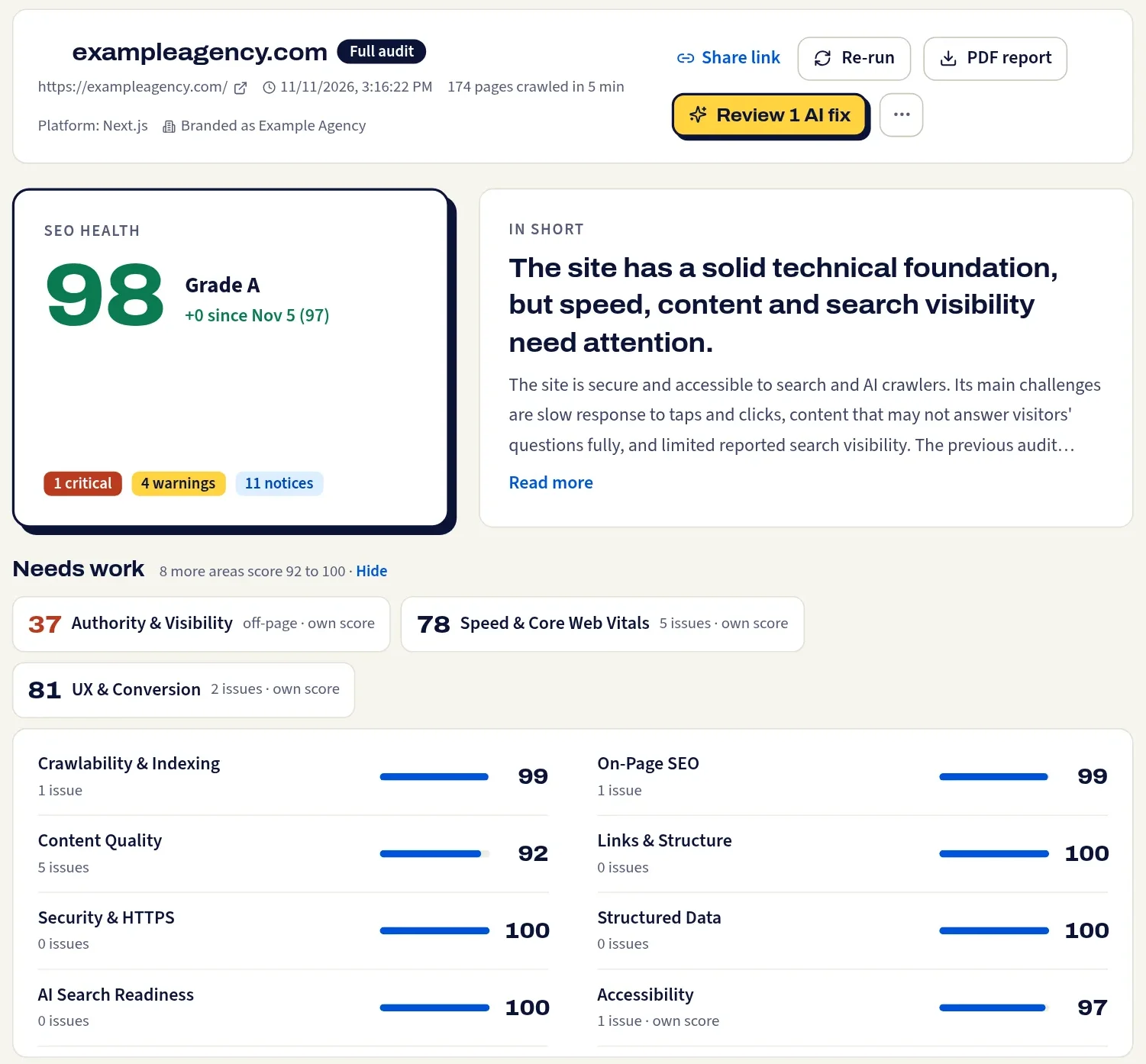 The Site Audit summary in RankThat. AI Search Readiness gets its own score next to crawlability, speed and the rest.
What to do first
If you have one hour:
- Run the AI crawler checker on your homepage and one service page. Fix any blocks.
- Check your homepage has Organization or LocalBusiness schema with the right name, phone and
sameAslinks. - Rewrite the opening of your three most important pages so they answer the main question in two sentences.
- Ask ChatGPT and Gemini the three questions you most want to be the answer to, and write down what they say.
In RankThat, the Site Audit includes AI readiness checks (AI crawler access and llms.txt among them), and on WordPress the Bridge plugin can apply the robots.txt, llms.txt and Organization schema fixes after you approve them. On a site that uses Cloudflare, the Cloudflare Worker can apply the same three (see fixes on every platform).
FAQ
Do I need a separate strategy for AI search?
Mostly no. Being crawlable, indexed, clearly described and genuinely useful covers most of it. The differences are crawler access for non-Google bots, content that can be quoted passage by passage, and tracking that looks at the assistants themselves.
Should I block GPTBot?
That depends on whether you are comfortable with your content being used for model training. Blocking GPTBot does not remove you from ChatGPT search results; that is OAI-SearchBot. Decide on each bot separately.
Does llms.txt help me rank in ChatGPT?
There is no public evidence that it does. It is harmless and quick to add, so treat it as a small extra, not a priority.
How long before changes show up in AI answers?
It varies. Google-based answers follow recrawling and reindexing, which can be days to weeks. Other assistants refresh on their own schedules. Track the same questions every week so you can see when it changes.