

A technical SEO checklist makes sure search engines can crawl your pages, index the right ones, and load them quickly on a phone. If any of those fail, the content on the page does not get a chance. This is the list we run on every new client site, grouped by area and in the order that finds the expensive problems first.
Each item has a short reason and the tool that checks it. Most checks need only Google Search Console and a crawler. Our example is Coastline Plumbing, a fictional 60-page WordPress site in Austin, Texas.
For the full audit process around this list, see how to do an SEO audit.
Crawling
| Check | Why it matters | Check it with |
|---|---|---|
| robots.txt exists and does not block important folders | A stray Disallow: / from staging blocks the whole site |
robots.txt report in Search Console, robots.txt checker |
| robots.txt does not block CSS or JavaScript | Google needs them to render the page as users see it | URL Inspection › View crawled page |
| Your firewall or CDN does not block search engine crawlers | Pages that load in a browser can still return 403 to a bot | Crawl Stats report, server logs |
| Every important page is linked from at least one other page | Orphan pages are found late or not at all | Site crawl |
| Key pages are within three clicks of the homepage | Deep pages get crawled less often. See crawl depth | Site crawl |
Internal links are plain <a href> links |
Links that only work through JavaScript click handlers may not be followed | View source |
| AI crawlers you want are allowed | OAI-SearchBot, PerplexityBot and others follow their own rules | AI crawler checker |
For the AI side, our guide on how to allow AI crawlers has the exact robots.txt lines.
Indexing
| Check | Why it matters | Check it with |
|---|---|---|
No important page has noindex |
A leftover noindex from development quietly removes pages from Google | Page indexing report: “Excluded by ‘noindex’ tag” |
No noindex sent as an HTTP header by mistake |
An X-Robots-Tag header is invisible in the page source | URL Inspection, or check response headers |
| Each page has a self-referencing canonical tag, or points to the right version | Stops Google picking a different duplicate for you | URL Inspection: “User-declared canonical” vs “Google-selected canonical” |
| The XML sitemap lists only indexable 200 pages | Redirects, 404s and noindexed URLs in the sitemap waste crawling and send mixed signals | Sitemaps report, site crawl |
| The sitemap is submitted and recently read | Confirms Google can fetch it | Sitemaps report |
| Thin, duplicate and low-value URLs are kept out of the index | Index bloat dilutes the site and slows discovery of pages that matter | Page indexing report, site: search |
| You have reviewed “Crawled - currently not indexed” | Google saw these pages and chose not to index them, often a quality signal | Page indexing report |
If that last report is long, start with what “Crawled - currently not indexed” means and then how to fix it.
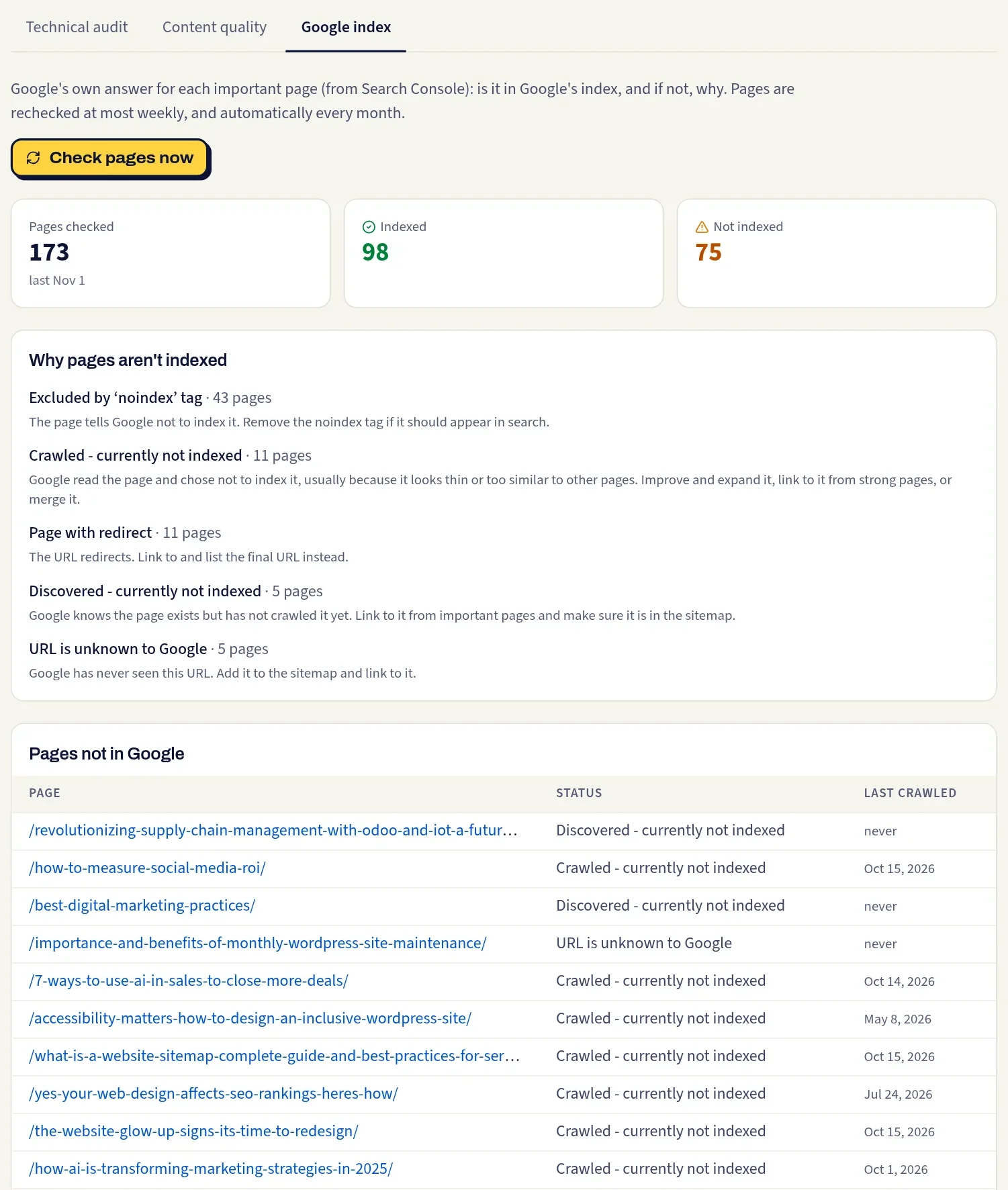 The Google index tab in RankThat’s Site Audit. Search Console’s answer for each important page, grouped by the reason it isn’t indexed.
Status codes and redirects
| Check | Why it matters | Check it with |
|---|---|---|
| Important pages return 200 | Anything else and they cannot rank | Site crawl |
| Pages that are gone return 404 or 410, not a 200 “not found” page | A soft 404 wastes crawling and confuses Google | Page indexing report: “Soft 404” |
| Moved pages use 301 redirects to the closest match | Keeps most of the old page’s value and sends visitors somewhere useful | Redirect checker |
| No redirect chains of more than one hop | Each hop slows the visit and Google stops after a few | Redirect checker, site crawl |
| Internal links point at the final URL, not at a redirect | Saves a hop on every click and every crawl | Site crawl |
| No 5xx server errors on key templates | Repeated server errors make Google slow its crawling | Crawl Stats report, Page indexing report |
| Maintenance windows return 503, not 200 | A 503 tells Google to come back later instead of indexing an error page | Response headers |
For what each code means in practice, see HTTP status codes. Broken links get their own guide later in this series.
Site structure and URLs
- Use clean, readable URLs:
/water-heater-repair/, not/?p=482. They are easier to share and to understand in the results. - Pick one version of the domain (with or without www, always HTTPS) and redirect the others to it. Four live versions of the homepage split signals.
- Keep trailing slashes consistent across the site and its internal links.
- Handle URL parameters from filters, sorting and tracking with canonical tags, so they do not create thousands of near-duplicate URLs.
- Add breadcrumbs on deeper pages. They help users, give crawlers another path, and can show in the results.
- Set up hreflang only if you have the same content in several languages or regions. Most local businesses do not need it.
Speed and Core Web Vitals
Google’s Core Web Vitals measure loading, responsiveness and visual stability from real Chrome users. The thresholds for “good” are an LCP of 2.5 seconds or less, an INP of 200 milliseconds or less and a CLS of 0.1 or less (web.dev: Web Vitals).
| Check | Why it matters | Check it with |
|---|---|---|
| Core Web Vitals report shows few or no “Poor” URLs on mobile | Field data from real visitors, grouped by similar pages | Core Web Vitals report in Search Console |
| LCP image is not lazy-loaded and is compressed | The biggest image above the fold is usually what makes LCP slow | PageSpeed Insights |
| Images are compressed and sized for their slot | Oversized images are the most common speed problem we see on small business sites | PageSpeed Insights, Lighthouse |
| Few render-blocking resources | CSS and scripts in the head delay the first paint | PageSpeed Insights |
| Server response is fast | A slow time to first byte delays everything after it | PageSpeed Insights |
| Images, ads and embeds have reserved space | Prevents layout shifts as the page loads | PageSpeed Insights (CLS) |
| Heavy third-party scripts are limited | Chat widgets and trackers often hurt INP | Lighthouse, Chrome DevTools |
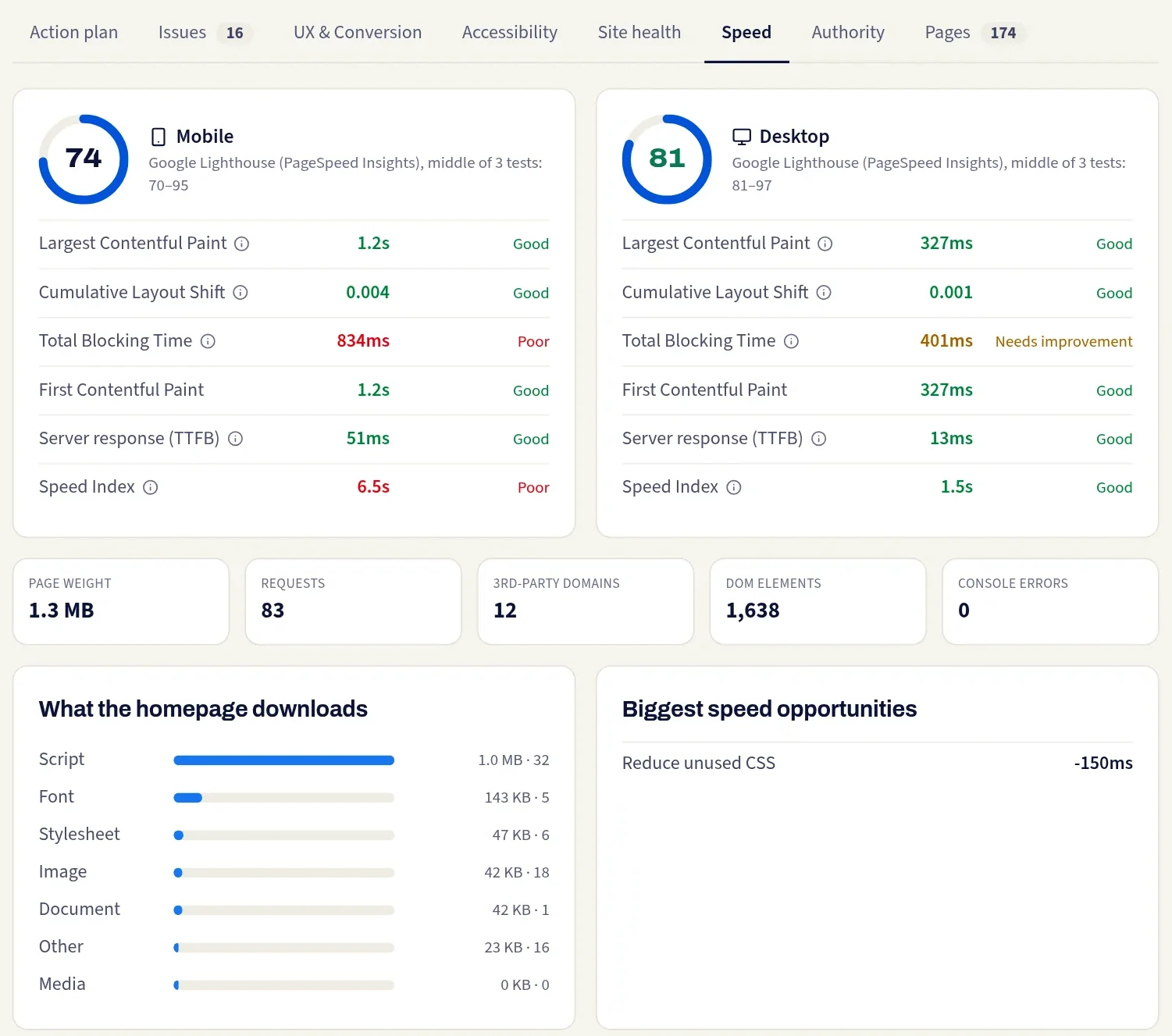 The Speed tab in RankThat’s Site Audit: Core Web Vitals for mobile and desktop, page weight and the largest files the homepage downloads.
Mobile
- Same content on mobile and desktop. Google indexes the mobile version of your pages, so anything hidden on mobile may as well not exist.
- Viewport meta tag set and text readable without zooming.
- Buttons and links big enough to tap, with space between them.
- No pop-ups that cover the main content as soon as the page opens on a phone.
Check on a real phone and with Lighthouse in Chrome DevTools. Google retired its standalone Mobile-Friendly Test in 2023.
Security
| Check | Why it matters | Check it with |
|---|---|---|
| Whole site on HTTPS, HTTP redirects to HTTPS | Browsers warn on insecure pages, and HTTPS is part of page experience | Browser address bar, redirect checker |
| No mixed content (HTTP images or scripts on HTTPS pages) | Browsers block or flag it | Browser console, site crawl |
| Valid SSL certificate that renews automatically | An expired certificate shows a full-page warning to every visitor | Browser, hosting panel |
| Security headers set (HSTS, X-Content-Type-Options and similar) | Protects visitors and shows the site is maintained | Response headers |
| Security issues report is clear | Hacked content or malware gets pages flagged in the results | Security issues report in Search Console |
Structured data
- Organization or LocalBusiness schema on the homepage or contact page, using the most specific type (
Plumberfor Coastline). - Breadcrumb schema if you show breadcrumbs.
- Schema matches the visible page. Ratings, prices and FAQs in the markup must be on the page too.
- No errors in Search Console’s rich result reports, under Enhancements.
Test with the Rich Results Test, or build clean JSON-LD with the free schema generator.
Run it with a crawler
Doing this by hand on a 60-page site takes most of a day. A crawler does the first pass in minutes. RankThat’s Site Audit runs 100+ checks across crawlability, indexing, links, speed, security, schema, mobile and AI readiness, crawling as RankThatBot. Each issue says why it matters and how to fix it.
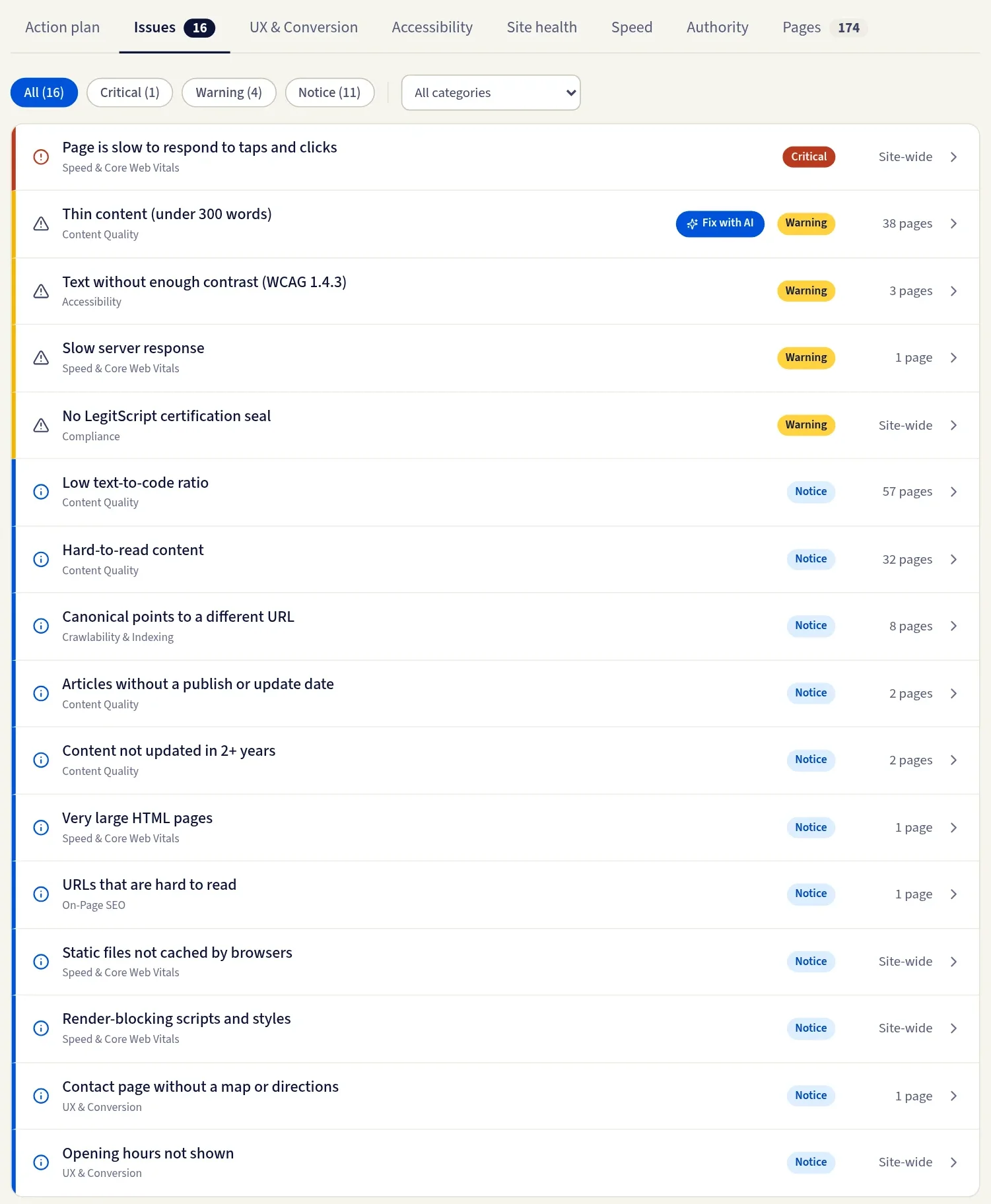 The issues list in RankThat’s Site Audit, sorted by severity. Every issue says why it matters and how to fix it.
On Coastline’s site, the first crawl found a redirect chain on the contact page, an orphaned slab leak page and a hero image that was 3,800 pixels wide on every service page. On WordPress, fixes like those (redirects, internal links for orphan pages, image compression, LCP image priority) can be drafted and applied through the free Bridge plugin once you approve them, and each one can be undone. On a site that uses Cloudflare, the Cloudflare Worker can apply redirects too. Search Console still has the final word on what Google indexed.
FAQ
How often should I run a technical SEO check?
Run the full list when you take on a site, after a redesign or migration, and once or twice a year. Run a crawl monthly (weekly on large sites) to catch new 404s, noindex mistakes and speed regressions.
What should I fix first?
Anything that stops important pages being crawled or indexed: robots.txt blocks, noindex on key pages, server errors and broken redirects. Speed and structure come after.
Do I need to fix every warning?
No. Fix what affects the pages that bring in business. A missing alt attribute on a 2019 blog post can wait; a noindex on your main service page cannot.
Is technical SEO a one-time job?
The big fixes usually are. Keeping things clean is not: plugins update, pages get added, and redirects pile up. A regular crawl catches problems before they cost traffic.