

“Crawled - currently not indexed” means Google fetched the page and decided not to add it to its index, for now. “Discovered - currently not indexed” means Google knows the URL exists but hasn’t crawled it yet. The fix for the first is usually a better or more distinct page with stronger internal links; the fix for the second is usually a clearer crawl path and a site that is easier and faster to crawl.
Neither status is an error. Google’s own help for the Page indexing report says non-indexed URLs can be fine, and for crawled pages it says there is no need to resubmit them. The work is deciding which URLs actually matter, then giving Google a reason to index those. Our glossary entry on Crawled - currently not indexed covers the definition; this guide is the fix.
Where to find the statuses
In Google Search Console, open Indexing > Pages. The table “Why pages aren’t indexed” lists every reason with a count. Click a reason to see example URLs (up to 1,000).
For a single URL, paste it into URL Inspection at the top of Search Console. It shows whether the URL is on Google, when it was last crawled, which canonical Google chose, and whether the page was found in a sitemap or through a referring page.
Step 1: Sort the URLs before you fix anything
Export the example URLs and sort them into three piles. On most sites we audit, the majority of URLs under these statuses are in the first pile.
| Pile | Examples | What to do |
|---|---|---|
| Should never be indexed | Search results pages, filter and sort URLs, tag archives, feed URLs, attachment pages, ?replytocom= |
Nothing, or stop creating them (noindex, canonical, fewer links to them) |
| Low value, could go | Old news posts, near-empty location pages, tiny category pages | Improve, merge into a stronger page, or remove |
| Important | Service pages, product pages, main guides | Fix these first, using the steps below |
A large first pile is a sign of index bloat: the site produces far more URLs than it has useful pages, and Google spends its time on the junk.
For Bean & Barrel Coffee, a fictional WooCommerce store, the “Crawled - currently not indexed” list had about 900 URLs. Around 850 were filter combinations like /shop/?roast=dark&origin=colombia&orderby=price. The other 50 included 14 product pages. Those 14 were the real problem.
Fixing “Crawled - currently not indexed”
Google read the page and chose not to index it. Google doesn’t give a reason, but on real sites the cause is almost always one of these.
1. The page is too similar to another page
Check whether another URL covers the same thing. Common cases: product variants with identical descriptions, location pages where only the town name changes, and blog posts that repeat a service page.
In URL Inspection, compare “User-declared canonical” with “Google-selected canonical”. If Google picked a different URL, it sees the pages as duplicates. Either make the page clearly distinct, or merge it and point a canonical tag or a 301 redirect at the version you want. See duplicate content for the patterns.
Bean & Barrel’s 14 unindexed products had the supplier’s description pasted word for word, the same text hundreds of other shops use. Rewriting each with tasting notes, roast date policy and brewing advice got 11 of them indexed within a few weeks.
2. The page doesn’t add enough
Short pages that say less than the pages already ranking are a classic case of thin content. Ask honestly: if this page vanished, would a searcher miss anything?
What helps:
- Answer the questions people actually ask about the topic, with specifics (prices, timings, steps, local details).
- Add original material: photos of real work, your own data, examples from jobs.
- Show who wrote it and why they know. Google’s helpful content guidance is the yardstick.
If a page can’t be made useful, merge it into a stronger page or remove it. Fewer, better pages tend to get indexed more reliably.
3. Google doesn’t see the page as important
Pages with few or no internal links look unimportant. A page linked only from the XML sitemap, or an orphan page with no links at all, is often crawled and then left out.
Add links from relevant, well-linked pages with descriptive anchor text. Pages buried five or six clicks from the homepage suffer too; crawl depth matters more than most people expect. Bring important pages within three clicks of the homepage where you can.
4. The page Google crawled isn’t the page you see
If the main content loads with JavaScript after the page opens, Google may have seen an almost empty page. Use URL Inspection’s Test live URL, then View tested page to see the rendered HTML and screenshot. If the text is missing there, the content needs to be in the initial HTML or render reliably.
5. Then: request indexing for the important ones
Once a page has really changed, use Request indexing in URL Inspection for the handful of pages that matter most. It doesn’t guarantee indexing, and requesting it for an unchanged page does nothing useful. For bigger batches, keep the XML sitemap accurate with correct lastmod dates and let Google come back.
Fixing “Discovered - currently not indexed”
Here Google hasn’t crawled the URL yet. Google’s help says the crawl was usually rescheduled because crawling then was expected to overload the site, which is why the last crawl date is empty. On small sites the real cause is more often that Google doesn’t see enough reason to crawl yet.
Work through these:
- Is the site slow or erroring? Open Settings > Crawl stats in Search Console. High average response times, or many 5xx responses, make Google crawl less. Fix hosting, caching and slow plugins first. See time to first byte.
- Is the site generating too many URLs? Filters, calendars, session IDs and tag pages can create thousands of URLs that compete for the same crawl budget. Stop linking to the ones that shouldn’t exist, and block pure crawl traps (like infinite calendar pages) in robots.txt.
- Are the pages linked from anywhere that gets crawled? A sitemap alone is a weak signal. Link new pages from the homepage, a hub page or a recent post.
- Is the sitemap clean? It should list only live, indexable URLs that return 200. Sitemaps full of redirects and noindexed URLs lower trust in the whole file.
- Did you just publish a lot at once? A new site, or 500 programmatic pages launched in one day, will often sit in “Discovered” for a while. Publish in batches and link each batch properly.
How RankThat helps
With Search Console connected, RankThat’s Site Audit shows which of your important pages Google has indexed and the reason for each one it hasn’t, with plain advice for each status. The same audit flags the usual causes: duplicate content, thin pages, orphan pages, pages buried deep in the site, noindex mistakes, broken canonicals and sitemaps listing redirected or broken URLs.
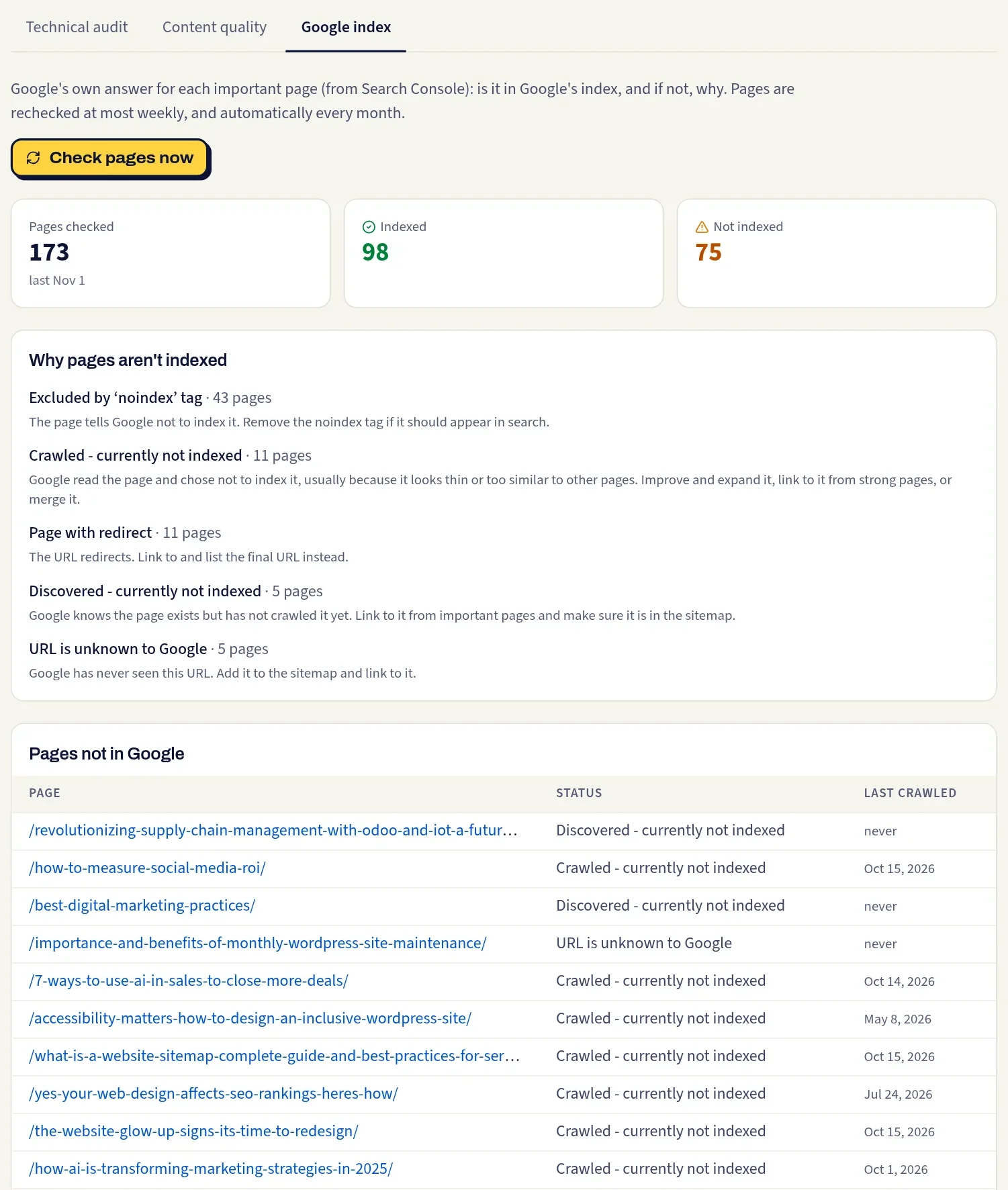 The Google index tab in RankThat’s Site Audit. Search Console’s answer for each important page, grouped by the reason it isn’t indexed.
For a wider list of checks, see the technical SEO checklist, and for the other statuses in the Pages report, our guide on how to fix crawl errors.
Mistakes we see
- Requesting indexing over and over. It doesn’t change Google’s decision if the page is the same.
- Clicking Validate fix on these statuses. Validation is meant for issues you have fixed across all URLs. Here, the signal that matters is whether your important URLs move to “Indexed”.
- Panicking over filter and tag URLs. If they shouldn’t be indexed, Google leaving them out is the right outcome.
- Adding noindex to everything in the list. That stops Google indexing the important pages too. Sort first.
- Publishing near-duplicate location pages. Twenty pages that differ only by suburb name often end up crawled and not indexed. Make each one useful, or don’t publish it.
FAQ
How long does it take for a crawled page to get indexed?
There is no fixed time. After a real improvement, we usually see important pages picked up within days to a few weeks. Pages that stay out for months usually still have one of the problems above.
Is “Crawled - currently not indexed” a penalty?
No. It is a normal status. Google crawled the page and decided, for now, not to include it. It can change on a later crawl.
Should I delete pages that aren’t indexed?
Only if they have no value. Improve or merge pages that should rank. Pages that shouldn’t be in search can stay for visitors, or be noindexed if they clutter the report.
Why did a page drop from indexed to “Crawled - currently not indexed”?
Google re-evaluates pages over time. A page can drop out after a site-wide quality change, a new similar page, or competitors publishing better pages. Treat it like content decay: refresh it, as in our content refresh guide.
Does submitting a sitemap fix “Discovered - currently not indexed”?
It helps Google find URLs, but these are already found. Internal links, a faster server and fewer junk URLs do more.