

A service area page ranks when it gives someone in that town information they could not get from your other pages: the jobs you do there, the local conditions, how fast you get there, proof from local customers. A page that only swaps the town name into the same template is what Google calls doorway abuse, and it tends to drag the whole site down rather than add rankings.
This guide covers when a town deserves its own page, how to research and write one, how to link them, and how to check you have not built doorways. The example is Coastline Plumbing, a fictional plumber with an office in Austin, Texas, that also serves Round Rock, Cedar Park, Pflugerville and Georgetown.
What a service area page is
A service area page (often called a location page or city page) targets searches for a service in a place you serve, such as “water heater repair Round Rock”. It is different from a location page for a real office, which exists because customers visit that address.
Service area pages matter most for service area businesses: plumbers, roofers, cleaners and others who go to the customer. Your Google Business Profile ranks mainly near your address. Organic results for “[service] [town]” are where you can still compete in towns further out.
What Google says about doorway pages
Google’s spam policies describe doorway abuse as sites or pages created to rank for specific, similar search queries that lead people to intermediate pages that are less useful than the final destination. One of Google’s own examples is having multiple domain names or pages targeted at specific regions or cities that funnel users to one page.
The policy also lists creating substantially similar pages that are closer to search results than a clearly defined, browsable hierarchy. A set of 40 city pages that differ only in the town name fits that description almost exactly.
The same page also covers scaled content abuse: many pages generated mainly to manipulate rankings, with little value to users, however they are produced. AI-written town pages at scale fall here too.
The line, then, is not “city pages are bad”. It is whether each page is useful on its own to someone in that place.
| Doorway page | Useful service area page |
|---|---|
| Same text as every other city page, town name swapped | Written for that town, with details that only apply there |
| Exists only to rank, then pushes the visitor to the contact form | Answers the questions a local customer has |
| No local proof | Local jobs, photos, reviews from that area |
| Dozens of towns, including ones you rarely serve | Only towns you actively serve and want work in |
| Often not linked from anywhere except the footer | Part of a clear structure: services, areas, location pages |
Step 1: Decide which towns get a page
Not every town in your service radius needs a page. We use three tests:
- Do people search for the service plus that town? Check search volume for terms like “plumber Round Rock” and “water heater repair Cedar Park” in keyword research. RankThat’s Keyword research shows volume, difficulty and intent per term; Search Console shows town terms you already get impressions for.
- Do you actually work there regularly? If Coastline does two jobs a year in Georgetown, a Georgetown page would be thin on real substance. It would also promise a service level the business cannot keep.
- Can you write something specific about it? If you cannot think of five things that are true about working in that town and not elsewhere, the page is not ready.
Coastline ended up with three area pages, not the 30 its previous agency had built. Round Rock, Cedar Park and Pflugerville passed all three tests. Georgetown got a page six months later once jobs there had grown.
Step 2: Gather the local substance
This is the work that separates a page that ranks from a doorway page. Before writing, collect:
- Real jobs in that town. Types of work, with photos where the customer agrees. “Replaced a 50-gallon gas water heater in a 1990s home off Sam Bass Road” is useful. “We serve Round Rock” is not.
- Local conditions. For a plumber: water hardness, common pipe materials in the housing stock, slab foundations, freeze risk. A roofer might cover hail history and HOA rules. A pest company, the pests that peak there.
- Rules and permits. Who issues permits, whether the city requires inspection for a water heater replacement, utility rebates that apply. Check each one before you publish.
- Logistics. Typical arrival times, whether emergency calls are covered, any trip fee.
- Local proof. Reviews from customers in that town (with first name and town only), the team members who cover it, local memberships.
- Questions local customers ask. Your office staff know these. Write them down.
If your notes for a town fit on one line, stop and keep that town on a general “areas we serve” page instead.
Step 3: Write the page
A structure that works for most service businesses:
- A title and H1 that name the service and town. “Plumber in Round Rock, TX | Coastline Plumbing” for the title, and a plain H1 like “Plumbing services in Round Rock”.
- An opening paragraph that says what you do there, how fast you arrive and how to book.
- Services in that town, each linking to the main service page. Do not rewrite the full service page here. Summarize and link.
- Local section: the conditions, rules and common jobs you gathered.
- Recent work with photos and short descriptions.
- Reviews from customers in that area.
- Local FAQ: three to five questions specific to the town.
- A clear call to action with a tappable phone number.
Length follows substance. On most sites we audit, the area pages that rank have a few hundred words that are truly local, not 1,500 words of padding. RankThat’s Site Audit flags pages under 300 words as thin content, which is a useful floor, not a target.
Avoid near-duplicates without hiding behind tricks
Rewording the same paragraph five ways does not make five unique pages. Neither does shuffling sentences. If the local sections are what differ, keep the shared parts short and let the local parts carry the page. See duplicate content and thin content for how Google treats both.
Step 4: Add the technical pieces
- URL structure. Something clear like
/areas/round-rock/or/plumber-round-rock/. Pick one pattern and keep it. - Schema. Use your
LocalBusiness(orPlumber) schema withareaServedlisting the towns. Do not create fake addresses in those towns. See LocalBusiness schema. - No fake addresses anywhere. Not on the page, not in schema, not in a Google Business Profile. A profile at an address where you do not meet customers breaks Google’s guidelines.
- Self-referencing canonical. Each area page should point its canonical tag at itself, not at the homepage.
- Indexable and in the sitemap. Obvious, and often missed when pages were built by a plugin.
{
  "@context": "https://schema.org",
  "@type": "Plumber",
  "name": "Coastline Plumbing",
  "telephone": "+1-512-555-0142",
  "url": "https://www.example.com/",
  "areaServed": [
    { "@type": "City", "name": "Austin" },
    { "@type": "City", "name": "Round Rock" },
    { "@type": "City", "name": "Cedar Park" },
    { "@type": "City", "name": "Pflugerville" }
  ]
}
Step 5: Link the pages into the site
Doorway pages are usually only reachable through a footer list of 40 towns. Useful pages sit inside a structure people and crawlers can follow.
- An “Areas we serve” hub page listing each town with a line about it.
- Links from service pages to the relevant area pages (“We install water heaters across Austin, Round Rock and Cedar Park”).
- Links from area pages back to service pages and to the contact page.
- Descriptive anchor text, such as “plumber in Round Rock”, rather than “click here”. See internal links.
An area page with no internal links is an orphan page. Google may not find it, and if it does, it gets little weight.
Step 6: Check for doorway patterns
Once the pages are live, check them like Google would see them.
- Crawl the site. RankThat’s Site Audit flags duplicate content across pages, thin content, duplicate titles and pages with very few internal links. A cluster of area pages on those lists is the clearest warning sign.
- Read three area pages side by side. If you could swap the town names and nobody would notice, they need work.
- Check Search Console. In the Page indexing report, area pages stuck in Crawled - currently not indexed can mean Google sees them as too similar to each other.
- Look at the queries. Each area page should get impressions for its own town. If they all show the same generic queries, Google is not treating them as separate pages.
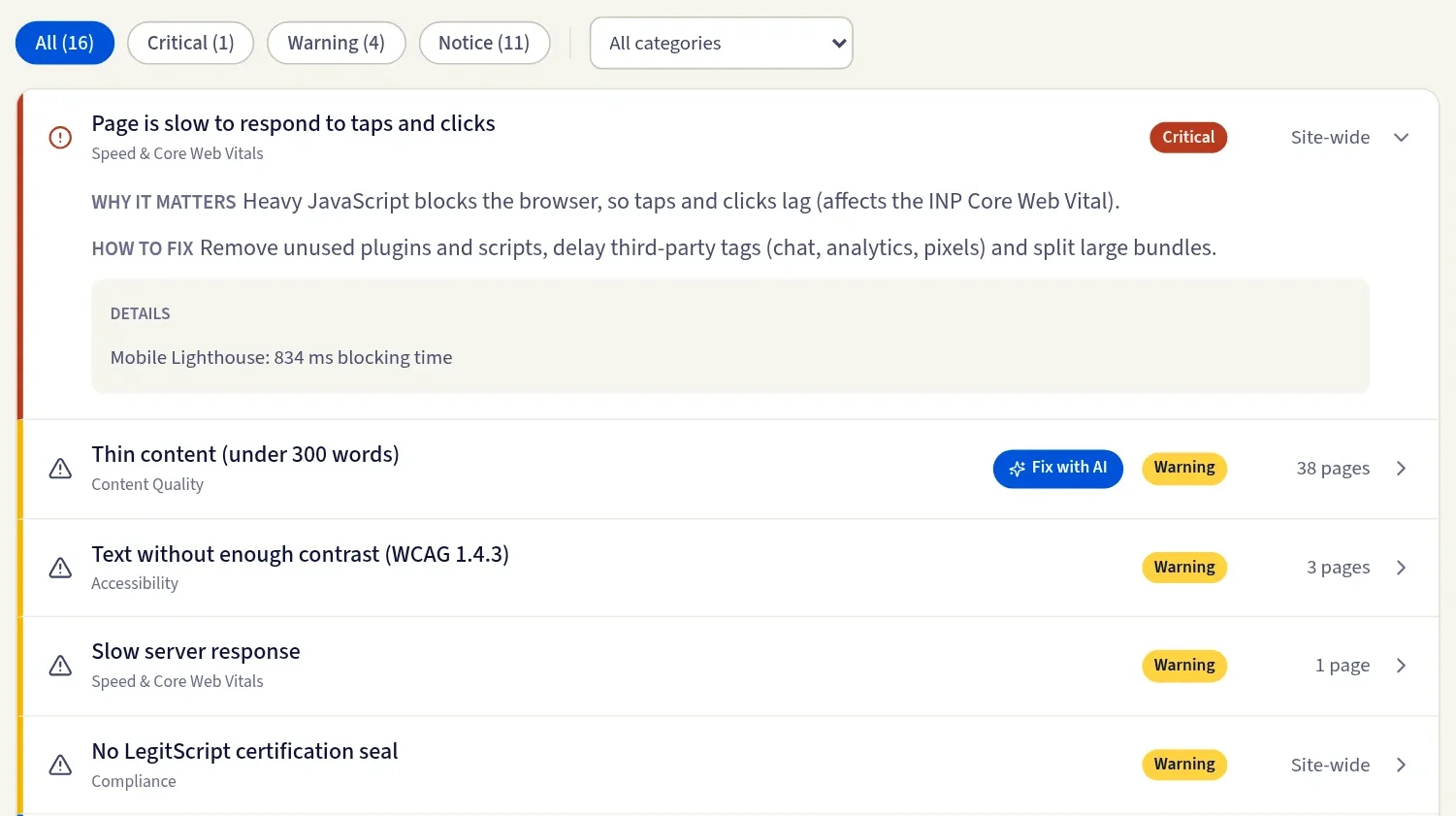 The issues list in RankThat’s Site Audit. Duplicate and thin content across area pages shows up here, each with why it matters and how to fix it.
What to do with existing doorway pages
If you inherit 30 near-identical town pages:
- Keep the towns that pass the three tests in step 1 and rewrite them with real substance.
- Merge the rest into one “Areas we serve” page.
- 301-redirect the removed pages to that page or to the nearest kept area page.
- Remove them from the sitemap and update internal links.
Expect a quiet few weeks while Google recrawls. The usual pattern after a clean-up like this is fewer pages, each one getting impressions for its own town terms instead of none of them ranking.
Common mistakes
- Pages for towns you do not really serve. They bring calls you turn away, and they are the easiest to spot as doorways.
- The same reviews and photos on every page. Use local proof or none.
- Fake addresses in the text, schema or a Business Profile.
- Spinning or AI-rewriting one template. It is still the same page, and scaled content abuse covers it regardless of how it was made.
- Forgetting the main service pages. Area pages support service pages. They do not replace them.
For the profile side of local rankings, see how to rank in Google Maps, and for reviews that can appear on area pages, how to get more Google reviews. The local SEO checklist covers the rest.
FAQ
Are city pages bad for SEO?
No. Pages that are useful to people in each town are fine and often rank well. The problem is near-identical pages created only to rank, which Google’s spam policies call doorway abuse.
How many service area pages should I have?
As many as there are towns you serve regularly, that people search for, and that you can write something specific about. For most local businesses, that is a handful, not dozens.
Should I put a fake address on a city page to rank there?
No. Fake addresses on pages, in schema or in a Business Profile break Google’s guidelines and mislead customers. Use areaServed in schema and describe the area in the text.
Can I use AI to write service area pages?
AI can help draft structure, but the substance has to come from you: real jobs, local conditions, local reviews. Generating many similar pages mainly to rank is scaled content abuse under Google’s spam policies, however the text was produced.