

To rank higher in Google Maps, make your Google Business Profile the best match for the search (relevance), get more and better reviews and mentions than nearby competitors (prominence), and back the profile up with a website that confirms everything it says. Distance, the third factor, you mostly cannot change, so the work goes into the other two.
This guide covers what Google says about Maps rankings, the order we work in on client profiles, and how to measure progress without fooling yourself. The example is Coastline Plumbing, a fictional plumber in Austin, Texas, that works from a small office in Westlake and serves the whole metro area.
How Google ranks businesses in Maps
Google’s help page on improving your local ranking names three factors:
| Factor | What it means | What you can do |
|---|---|---|
| Relevance | How well your profile matches what the person searched | Categories, services, description, website content |
| Distance | How far your business is from the searcher, or from the place named in the search | Very little. Set your address or service area correctly |
| Prominence | How well known your business is | Reviews, ratings, links and mentions across the web, a strong website |
The same ranking logic drives the Maps app and the local pack, the map with three businesses that appears in normal Google results. Rank well in one and you usually rank well in the other.
Google also says there is no way to pay for a better local ranking. Ads appear in Maps, but they are labeled and separate from the organic list.
Why distance matters more than most people think
Proximity is the reason two people searching “plumber” from different parts of Austin see different lists. For a near me search, Google uses the searcher’s location. For “plumber in Round Rock”, it uses Round Rock.
This has two practical results:
- You will almost always rank well near your own address and worse further away. That is normal, not a penalty.
- Strong relevance and prominence widen the area where you rank. A profile with 300 reviews and the right category often holds the top three several miles further out than a competitor with 20 reviews.
Step 1: Get the profile basics right
Before anything else, check the profile is verified and complete. An unverified or half-filled profile is the most common reason a real business does not show at all.
- Business name. Use the name on your sign, van and invoices. Google’s guidelines for representing your business say unnecessary information in the name is not permitted. “Coastline Plumbing” is right. “Coastline Plumbing Austin 24/7 Emergency Plumber” invites an edit or a suspension, and competitors do report it.
- Address or service area. If customers come to you, show the address. If you go to them, Google says a service-area business should hide its address and set a service area instead. Coastline only takes walk-ins for parts pickup, so it shows the address and also lists its service area. See service area business.
- Hours. Accurate hours, including holiday hours. A profile that says “open” when you are closed earns bad reviews quickly.
- Phone and website. A local number that rings at the business, and a link to the most relevant page (the location page for multi-location businesses, not the homepage).
- One profile per location. Google’s guidelines say not to create more than one page for each location. Duplicate profiles split reviews and can both be removed.
Step 2: Choose the right categories
The primary category has more effect on which searches you show for than any other field. Our entry on Google Business Profile categories covers primary versus additional categories in detail. The short version:
- Pick the most specific primary category that describes your core business. For Coastline, “Plumber”. A business that only clears drains should look for a more specific drain category in the list.
- Add additional categories only for real services. Coastline adds a water heater category because it installs water heaters every week. It does not add “HVAC contractor” because it does not do that work.
- Check what the top three competitors use. Search your main term, open the leading profiles and look at the category under the business name. If all three use a category you missed, that is a strong hint.
- Use as few categories as possible. Google’s guidelines say exactly that. Ten loosely related categories dilute the profile rather than widen it.
After a category change, give it two to four weeks before judging the result. Rankings shift as Google reprocesses the profile.
Step 3: Fill in services, description, photos and attributes
These fields add relevance and give searchers reasons to pick you once they see you.
- Services. List each real service with a short, plain description: “Tankless water heater installation, including gas line and venting checks.” These help the profile match more specific searches.
- Description. Say what you do, where, and what makes you different, in normal sentences. No keyword lists, no links, no prices you do not honor.
- Photos. Real photos of the team, vans, finished jobs and the building. Google’s help page lists adding photos and videos as one of its own tips. Stock photos do nothing.
- Attributes. Fill in the ones that apply, such as accessibility details or payment options. They appear on the profile and in filters.
- Posts. Posts are not a big ranking lever in our experience, but they keep the profile current and give people one more reason to call.
Step 4: Build reviews steadily
Reviews feed prominence directly. Google says more reviews and positive ratings can help your local ranking. They also decide whether people choose you over the business next to you in the list.
What works on the profiles we manage:
- Ask every customer, the same day. Send the review link by text after the job. Coastline’s technicians ask in person and the office texts the link that evening.
- Aim for a steady flow, not a burst. Ten reviews a month for a year looks and performs better than 100 in one week followed by silence.
- Reply to every review. Google lists responding to reviews among its tips. Thank people by name and mention the job. For criticism, stay calm and offer to fix it.
- Never buy, filter or reward reviews. Paying for reviews, offering discounts for them and asking only happy customers all break Google’s policies.
Our entry on online reviews covers why they carry so much weight. In RankThat, the Reviews page shows your rating, unanswered reviews and a draft reply for each one that you edit before posting.
Step 5: Make the website confirm the profile
Google checks the website your profile links to. A strong site adds relevance, adds prominence through links, and ranks in the regular results under the map too.
- A page for each main service. Coastline has separate pages for water heaters, drain cleaning, slab leaks and repiping. A single “Services” page cannot match all of those searches.
- A page for each location, with the address, phone, hours, map and directions, matching the profile exactly.
- Area pages written with real substance, if you serve towns without an office. Copying one page 20 times with a new town name is a doorway page problem, not a ranking tactic.
- Titles that name the service and place, such as “Water Heater Repair in Austin, TX | Coastline Plumbing”.
- LocalBusiness schema (or the specific type, such as
Plumber) with your name, address, phone and hours. Our entry on LocalBusiness schema explains the fields, and the schema guide shows how to add it. - Tappable phone numbers and a visible call button on mobile. Most Maps searches happen on phones.
Step 6: Clean up citations and NAP
Citations are listings of your business name, address and phone on other sites: Apple Business Connect, Bing Places, Yelp, Facebook, the BBB and trade directories. Consistent NAP helps Google trust that your details are correct, and each good listing is another mention that supports prominence.
The order we use:
- Search your business name and old phone numbers to find existing listings.
- Fix wrong addresses and old numbers first. A previous address still listed on 15 sites causes more harm than a missing listing.
- Claim the core listings for your country, then two or three directories specific to your trade.
- Stop there. Hundreds of low-quality directory listings add little.
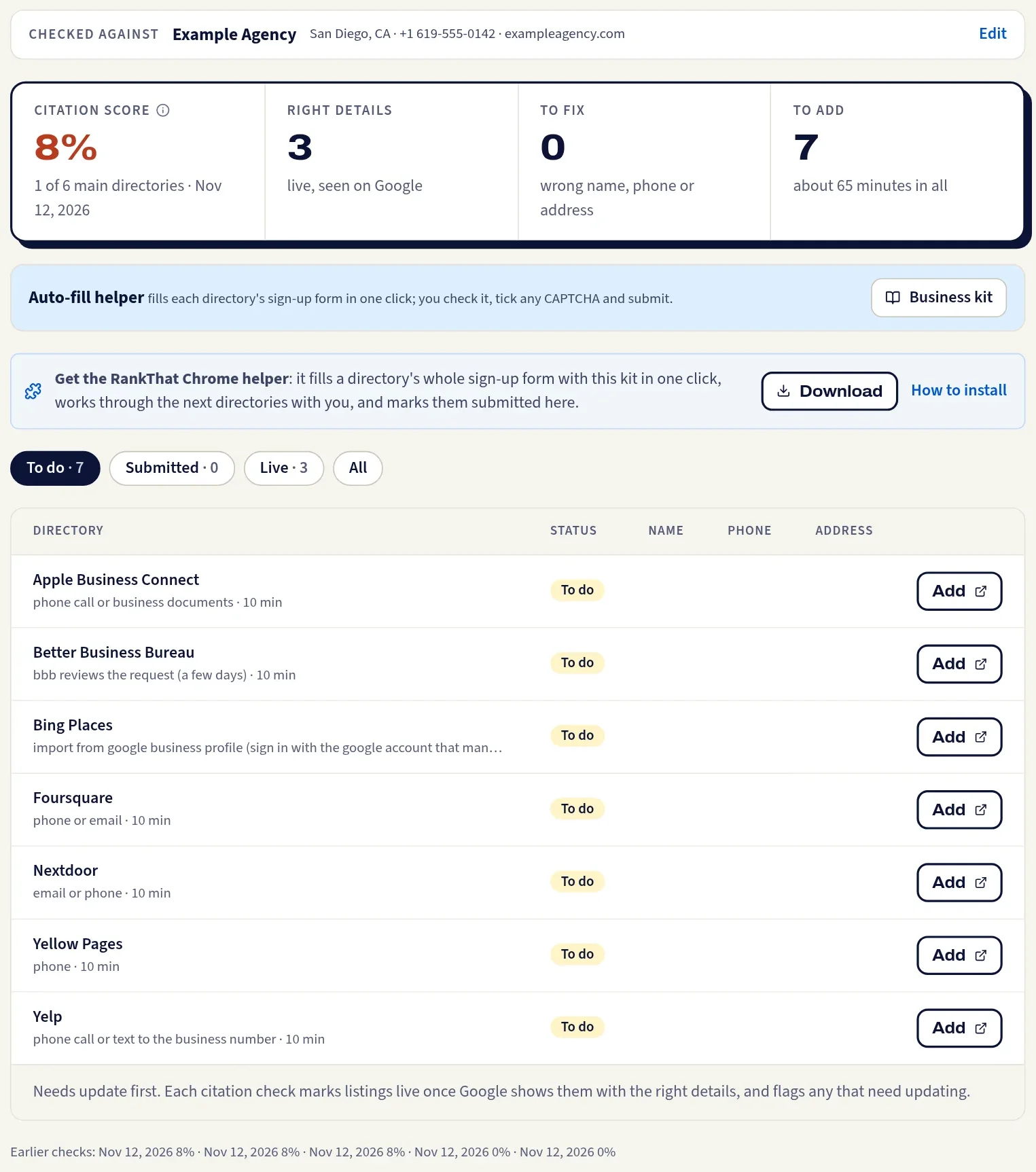 Citations in RankThat. Set the business details once, then check and submit the same name, address and phone everywhere.
Step 7: Earn local mentions and links
Google’s help page says prominence also draws on information from across the web, such as links. For a local business, the useful links are local and real:
- Suppliers and manufacturers that list certified installers
- Local news coverage of a sponsorship, a charity job or an expert comment
- Chambers of commerce, trade associations and licensing bodies
- Neighborhood associations, schools and clubs you sponsor
Coastline got a link and a short article from a local news site after volunteering to fix a community center’s water heater. That single mention did more than any directory.
Step 8: Measure on a grid, not from your desk
Checking your ranking by searching from your office tells you almost nothing, because you are standing next to your own business. A local rank grid checks your position at points spread across your service area and shows where you rank, where you drop and where you vanish.
In RankThat’s Local SEO section, you create a grid tracker for the business, choose a 3×3, 5×5 or 7×7 grid and a radius in miles, and add the keywords to check. Each scan shows your average rank, your visibility across the grid and how many points you were found at. Scans can run weekly or monthly.
Coastline’s first grid for “water heater repair” showed it in the top three across Westlake and central Austin, and missing entirely in the northern suburbs. That told us where to focus: area pages, reviews from customers in those suburbs, and one supplier link listing it as an installer there. Organic rankings for service and town terms are tracked separately in the Rank Tracker.
Common mistakes
- Keyword stuffing the business name. It may work for a few weeks. Then the name gets edited or the profile is suspended.
- Moving the pin or listing a virtual office. Google needs a real location where you meet customers, or a hidden address with a service area.
- Changing everything at once. If you change the category, the name and the website link in one day and rankings drop, you cannot tell which change caused it.
- Ignoring the website. A complete profile that links to a thin, slow page loses both rankings and calls.
- Judging results too soon. Most profile changes take a few weeks to show. Measure monthly.
For a full list of local tasks, see the local SEO checklist. Industry advice for this example is on our page about SEO for plumbers.
FAQ
How long does it take to rank higher in Google Maps?
Fixes to categories and profile details often show within a few weeks. Gains from reviews and links build over months. A new profile in a competitive city can take six months or more to reach the top three across a wide area.
Can I rank in Google Maps without a physical address?
Yes. Service-area businesses hide their address and set the areas they serve. You still need a real business location for verification, but it does not have to be shown. Expect to rank most strongly near that location.
Does adding keywords to my business name help?
It can for a short time, which is why people do it. It breaks Google’s guidelines, competitors can suggest an edit, and profiles get suspended for it. Use your real name and put the effort into categories, services and reviews.
Why do I rank first on my phone but customers cannot find me?
Because you are searching from next to your business. Rankings in Maps change with the searcher’s location. Check positions from points across your area with a grid tracker before you decide how you rank.