

The way to get more Google reviews is to ask every customer, at the moment they are happiest, with a direct link that opens the review box in one tap. Then reply to every review, and never pay for, filter or reward reviews, because Google removes those and US law now bans fake ones.
Most businesses we work with do not have a review problem. They have an asking problem. They do good work, but nobody asks, or the ask goes out a week later in a generic email. This guide covers the system we set up for clients, the rules that get businesses into trouble, and how to reply. The example is Brightside Dental, a fictional practice with three locations around Columbus, Ohio. (Our page on SEO for dentists covers the rest of their local work.)
Why Google reviews matter
Online reviews do two jobs at once:
- They help rankings. Google’s help page on local ranking says more reviews and positive ratings can help your business’s local ranking. They feed prominence, one of the three factors behind the local pack and Maps. Our guide on how to rank in Google Maps covers the other two.
- They decide who gets the call. When three dentists appear on the map, people compare the rating, the number of reviews, how recent they are and what they say. A 4.8 with 240 reviews and replies from the owner usually beats a 5.0 with six reviews from 2022.
Recency matters to people as much as volume. A profile where the newest review is eight months old looks closed, even when it is not.
Step 1: Get your review link
Google lets you ask customers to leave a review through a link or a QR code. Google’s page on getting reviews covers this. You will find the link to share in your Google Business Profile. Copy it once and keep it somewhere everyone can reach it.
The link opens your profile with the review box ready, so the customer does not have to search for you, pick the right location and scroll. Every step you remove raises the share of people who finish.
For multi-location businesses, each location has its own link. Brightside keeps three links, and each front desk only uses its own. A review sent to the wrong location helps the wrong profile.
In RankThat, the Reviews page shows the review link for each connected profile, with a ready-made email and text message you can copy.
Step 2: Ask at the right moment
Timing matters more than wording. Ask when the customer has just felt the benefit:
| Business | Best moment to ask |
|---|---|
| Plumber or other home service | Right after the job, while the technician is still there, then a text that evening |
| Dentist or clinic | At checkout, then a text within a few hours |
| Restaurant or cafe | On the receipt or a table card, then by email for online orders |
| Online store | A few days after delivery, once they have used the product |
| B2B services | After a milestone the client is pleased with, not with the invoice |
Two habits make the biggest difference on the profiles we manage:
- Ask in person first. “Would you mind leaving us a quick Google review? I’ll text you the link.” People who say yes face to face follow through far more often than people who only get an email.
- Send the link the same day. By the next week, the good feeling has faded and the request reads like marketing.
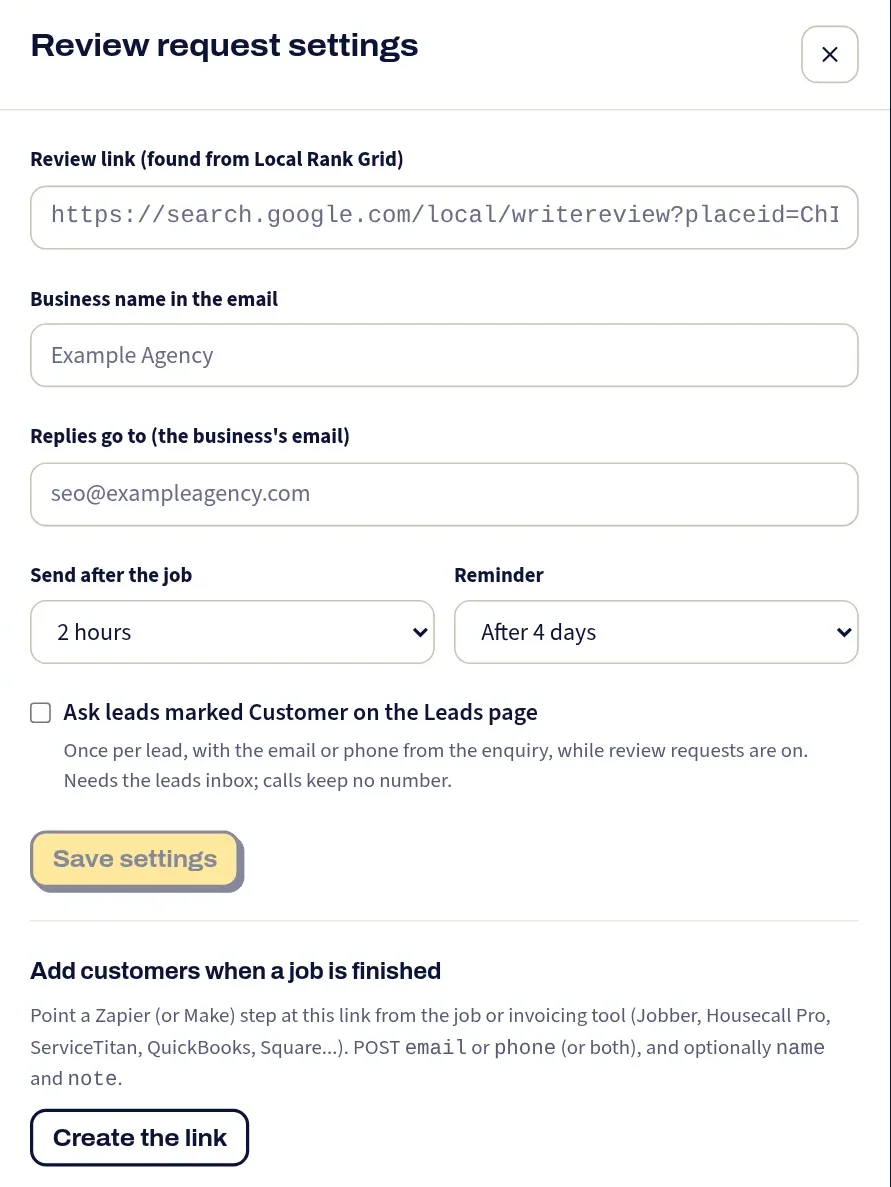 Review requests in RankThat. Each customer gets your Google review link after the job, with one reminder.
Step 3: Make it easy everywhere
Put the link and a QR code wherever customers already are:
- Text messages. The highest response channel for most local businesses. Keep it to two lines with the link.
- Email. After an appointment, an order or a project milestone.
- Printed QR codes. At the front desk, on receipts, on leave-behind cards and on invoices. Brightside has a small card at each checkout.
- Your website. A “Review us on Google” link on the contact or thank-you page.
- Email signatures for staff who deal with customers.
A text that works:
Hi Dana, thanks for coming in to Brightside Dental today. If you have a minute,
a Google review helps other families find us: [review link]
Short, personal, with one link. No pressure, no conditions, nothing offered in return.
Step 4: Know what Google forbids
This is where well-meaning businesses lose reviews, or worse. Google’s prohibited and restricted content policy for Maps covers fake engagement and rating manipulation. The practices it bans that we see most often:
| Practice | What it looks like | Why it is a problem |
|---|---|---|
| Review gating | Asking “how did we do?” first, then sending only happy customers to Google and unhappy ones to a private form | Google’s policy says businesses must not discourage negative reviews or selectively solicit positive ones |
| Incentives | “Leave a review and get 10% off”, a prize draw for reviewers, a free coffee | Google bans offering payment, discounts, free goods or services for reviews, including for changing or removing a bad one |
| Paid or fake reviews | Buying reviews from a service, or friends posting about jobs that never happened | Paid reviews and fake engagement are removed |
| Conflict of interest | Staff, owners or their families reviewing the business | The policy treats current or former employment as a conflict of interest |
| Pressure on the premises | Making customers write a review before they leave, or handing them a tablet to do it | The policy says merchants should not require or pressure users to leave reviews on the premises |
| Review quotas for staff | Telling each employee to collect a set number of reviews | Listed in the policy as a form of manipulation |
Asking every customer is fine. Asking only the ones you expect to be happy is not. A satisfaction survey is fine too, as long as everyone who takes it is offered the review link, whatever they answered.
At the least, Google removes the reviews it catches, and those are often the ones you worked hardest for. When a client asks us why their review count suddenly fell, an old incentive or a batch of reviews posted from the office is usually the first thing we look for.
The FTC rule on fake reviews (US)
In the US, the Federal Trade Commission announced a final rule banning fake reviews and testimonials in August 2024, in effect since October 2024. In plain terms, it bans:
- Writing, buying or selling reviews from people who do not exist or have no real experience with the business, including AI-written ones
- Offering rewards on the condition that the review says something positive or negative
- Reviews by officers and managers without a clear disclosure of their connection to the business
- Suppressing negative reviews through groundless legal threats, intimidation or false accusations
This is not legal advice. If you run a referral or loyalty program that touches reviews, check it with your lawyer.
Step 5: Reply to every review
Google’s own tips on local ranking include responding to reviews. Replies show people you are listening, and a calm reply to a bad review often does more for trust than a dozen five-star ones.
For positive reviews:
- Thank the person by first name.
- Mention something specific, such as the service or the team member.
- Keep it short. Two or three sentences is plenty.
For negative reviews:
- Wait until you are calm. Reply within a day or two, not within ten minutes.
- Thank them for the feedback and say you are sorry about their experience.
- Do not argue about details in public.
- Offer a way to sort it out offline: a name and a direct number.
- If the review breaks Google’s policies (it is fake, off-topic or from a competitor), report it through Google instead of arguing.
For healthcare, legal and financial businesses: never confirm that the reviewer is a patient or client, and never mention their treatment, case or account. Brightside’s template for a negative review says “We take every concern seriously. Please call our office manager, Priya, at the number below so we can look into this,” and nothing about the visit itself.
Keeping up with replies is the step that slips first. In RankThat, the Reviews page lists reviews waiting for a reply, lets you filter to three stars or less, and drafts a reply for each one that you edit and then copy into Google.
Step 6: Make it a routine, then measure it
Reviews stop when the routine stops. What we set up for clients:
- One person owns it at each location. At Brightside, the front desk lead at each practice.
- A daily habit. Ask at checkout, send the text before the end of the day.
- A weekly check. New reviews, unanswered reviews and anything to report.
- A monthly number. New reviews this month, average rating and reply rate, compared with last month and with the two or three nearest competitors.
The last point matters because “enough reviews” depends on your market. Twenty reviews might lead the map in a small town and be far behind in central Columbus. Compare yourself with the businesses you actually appear next to. RankThat’s Reviews page, part of Local SEO, shows you against local competitors, next to your local rank grid results.
For the rest of your profile, work through the Google Business Profile checklist, and see the local SEO checklist for the website side. Your star rating can also appear in regular results through review snippets in some cases, which has its own rules.
Common mistakes
- Asking a week later by email only. Most people never open it.
- One link for every location. Reviews end up on the wrong profile.
- A “rate us first” filter. It feels like good customer service. It is review gating.
- Replying with the same sentence every time. People notice, and it reads as automated.
- Arguing with a one-star review. Future customers read the reply more closely than the review.
FAQ
Can I offer a discount for leaving a Google review?
No. Google bans offering payment, discounts, free goods or services in exchange for reviews, and the FTC rule bans incentives tied to positive reviews. You can thank people after they review, as long as nothing was promised or conditional.
Can I ask only my happy customers for reviews?
No. Selectively asking satisfied customers is review gating, which Google’s policy forbids. Ask everyone the same way. In practice, most customers who had a normal, good experience leave a good review.
Can I delete a bad Google review?
You cannot delete a genuine review. You can reply to it, and you can report a review that breaks Google’s policies, such as fake reviews, spam, off-topic content or reviews from someone with a conflict of interest. Google decides whether to remove it.
How many Google reviews do I need?
There is no fixed number. Look at the businesses that appear next to you in the map for your main searches and aim to match or pass them, with a steady flow of new reviews every month.
Do review replies help rankings?
Google lists responding to reviews among its tips for local ranking, without saying how much it counts. Replies clearly help people choose you, which is reason enough to reply to all of them.