

A keyword mapping template is a spreadsheet that assigns each target keyword to exactly one page on your site, with its intent, its current ranking and what you need to do next. It stops two pages competing for the same search, shows which searches have no page at all, and turns a keyword list into a work plan.
Below is the template we use on client sites, ready to copy, then how to fill in each column, then a filled example for Coastline Plumbing, a fictional plumbing company in Austin, Texas. If the idea is new to you, our glossary entry on keyword mapping explains it in a few minutes.
The template
Copy this into Google Sheets or Excel. Each row is one page (or one page you plan to create).
| URL | Page type | Primary keyword | Secondary keywords | Intent | Volume | Difficulty | Current position | Status | Action | Notes |
|---|---|---|---|---|---|---|---|---|---|---|
If you prefer to paste it in one go, here is the header row as CSV:
URL,Page type,Primary keyword,Secondary keywords,Intent,Volume,Difficulty,Current position,Status,Action,NotesHow to fill in each column
| Column | What goes in it | Tip |
|---|---|---|
| URL | The page’s address, or “(new)” plus a proposed slug | One row per URL. If a URL appears twice, you have a cannibalization problem |
| Page type | Homepage, service, location, product, category, blog post, guide | Matches the format Google shows for the keyword |
| Primary keyword | The one search this page should win | The phrase goes in the title, H1 and opening lines |
| Secondary keywords | Close variants and sub-questions the same page answers | Usually 3 to 8. If they need their own section of 1,000 words, they may need their own page |
| Intent | Informational, commercial, transactional or local | See search intent |
| Volume | Monthly searches from your keyword tool | Use it to rank rows, not as a promise of traffic |
| Difficulty | Keyword difficulty score from the same tool | Compare within one tool only; scores differ between tools |
| Current position | Where the page ranks now, from a rank tracker or Search Console | Blank means it does not rank in the top 100 |
| Status | Live, Needs work, To create, Merge, Redirect | Lets you filter the sheet into a to-do list |
| Action | The single next step | “Rewrite title and add cost section”, not “optimize” |
| Notes | Competitors, internal links needed, dates | Anything the person doing the work needs |
Rules that keep a map useful
- One primary keyword per URL, one URL per primary keyword. That is the whole point of the map.
- Group keywords that share a results page. If Google shows the same top results for “water heater repair austin” and “water heater repair near me”, they belong on one page. If the results are different, they probably need different pages.
- Map intent before volume. A high-volume informational keyword on a service page will not convert and often will not rank.
- Map the pages you don’t have yet. Gaps are the most valuable rows in the sheet.
- Keep it alive. Update positions monthly and add a row every time a page is published.
Where the data comes from
- Keywords, volume, difficulty and intent: a keyword research tool. Our guide to keyword research for small businesses covers the process. In RankThat, Keyword research gives volume, difficulty and intent, keyword ideas, and saves keywords to lists you can export into the sheet.
- Current position and the ranking URL: a rank tracker, or Search Console › Performance (filter by query, then look at the Pages tab).
- Existing pages: your sitemap or a site crawl, so every live page gets a row.
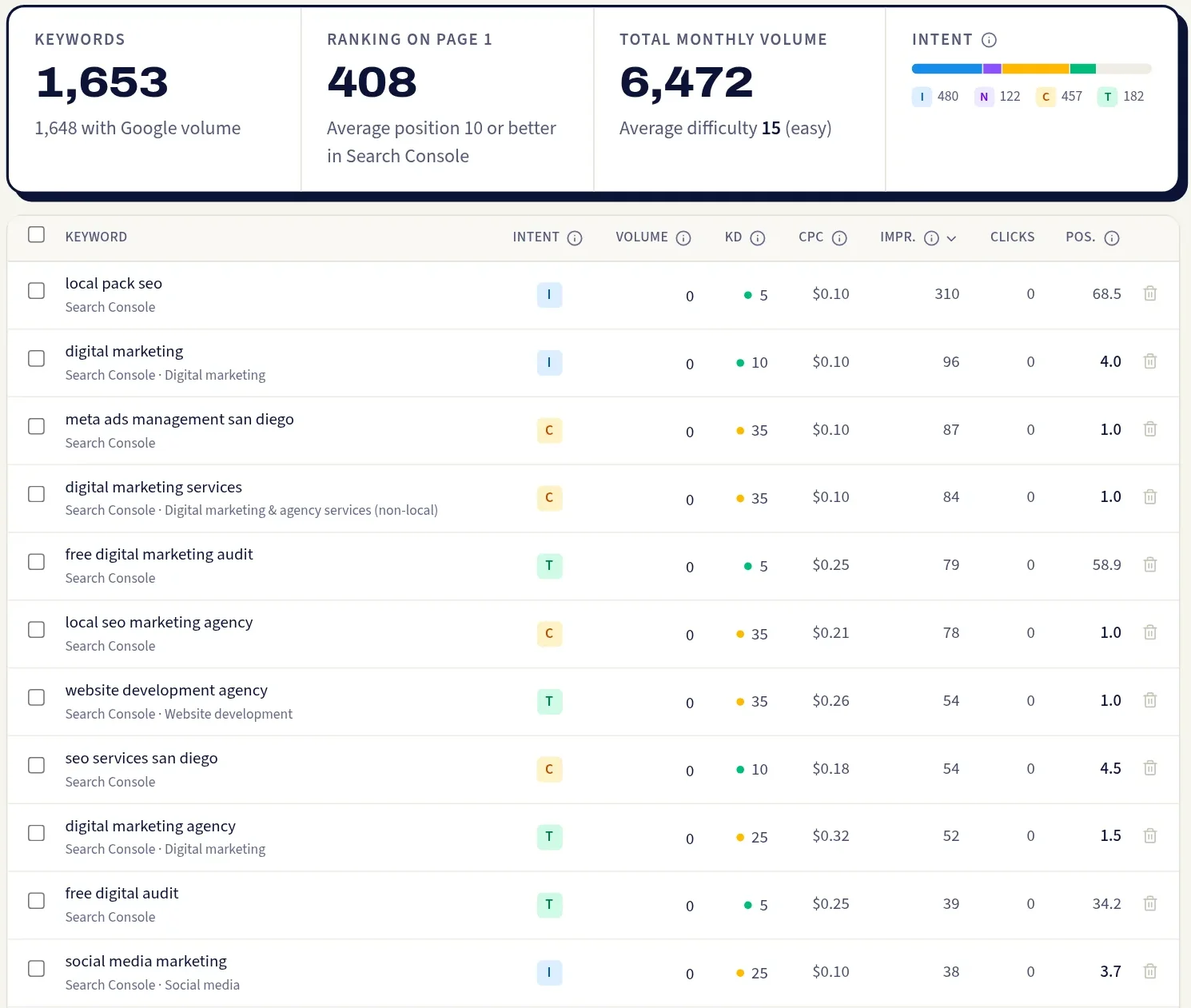 Keyword research in RankThat: volume, difficulty and intent for each keyword, ready to save to a list.
Filled example: Coastline Plumbing
Coastline has a 60-page WordPress site: a homepage, eight service pages, five area pages, a blog and the usual about and contact pages. Here is part of their map. We have left the Volume and Difficulty columns out of this example, because the figures depend on the tool and the month you pull them; in your sheet, fill them from your own keyword tool. Positions are for this fictional site.
| URL | Page type | Primary keyword | Secondary keywords | Intent | Current position | Status | Action |
|---|---|---|---|---|---|---|---|
| / | Homepage | plumber austin | plumbing company austin, austin plumbers, licensed plumber austin tx | Local | 9 | Needs work | Add service links above the fold; tighten title |
| /water-heater-repair/ | Service | water heater repair austin | water heater not heating, tankless water heater repair, water heater repair cost | Local | 14 | Merge | Merge the “Water heater tips” post into this page; 301 the post |
| /water-heater-replacement/ | Service | water heater replacement austin | tankless water heater installation, water heater replacement cost austin | Commercial | 22 | Needs work | Add a price range table and permit section |
| /drain-cleaning/ | Service | drain cleaning austin | clogged drain, sewer line cleaning, hydro jetting austin | Local | 6 | Live | Add two internal links from blog posts |
| /slab-leak-repair/ | Service | slab leak repair austin | slab leak detection, signs of a slab leak, foundation leak repair | Local | not ranking | Needs work | Page is orphaned: link from menu and leak detection page |
| /round-rock/ | Location | plumber round rock tx | round rock plumbing, emergency plumber round rock | Local | 11 | Needs work | Replace copied text with Round Rock specific jobs, ZIP codes and reviews |
| (new) /pflugerville/ | Location | plumber pflugerville | pflugerville plumbing company | Local | not ranking | To create | Write a real area page; see service area guide |
| (new) /emergency-plumber/ | Service | emergency plumber austin | 24 hour plumber austin, after hours plumber | Transactional | not ranking | To create | Create page; currently the homepage ranks at 31 for this |
| /blog/water-heater-tips/ | Blog post | (moved) | 15 | Redirect | 301 to /water-heater-repair/ after merge | ||
| (new) /blog/tankless-vs-tank-water-heater/ | Guide | tankless vs tank water heater | cost difference, which lasts longer, best for a family of four | Informational | not ranking | To create | Link to replacement page; target “People also ask” questions |
What the map showed
- A cannibalization problem. The water heater repair page and an old blog post were both ranking around 14 and 15 for the same keyword. Neither could break into the top ten. See keyword cannibalization.
- Two missing pages. “Emergency plumber austin” had no page, so Google was showing the homepage at position 31. Pflugerville had no area page at all.
- An orphan. The slab leak page existed but nothing linked to it.
- A thin location page. Round Rock’s page was the Austin page with the town name swapped. Our guide on creating service area pages explains what to write instead.
That became a ten-item work list, ordered by how close each page already was to page one. The drain cleaning page at position 6 and the homepage at 9 came first, because small changes there pay back fastest.
Keeping the map up to date
- Track every primary keyword in a rank tracker, set to your city and to mobile, and paste the positions into the sheet monthly. Our guide to tracking keyword rankings explains how to read the numbers.
- Watch for URL switching. If the ranking URL for a keyword keeps changing between two pages, that is cannibalization showing up.
- Add a row before you publish. Every new page should start life in the map, not be added after.
- Revisit intent once a year. What Google shows for a keyword can change.
RankThat’s Opportunities view lists pages close to page one by potential clicks and flags cannibalization, which is a quick way to choose the next rows to work on.
FAQ
How many keywords should I map to one page?
One primary keyword plus a handful of close variants and sub-questions. If a page needs to cover two different intents, it is two pages.
Should I map keywords to blog posts or service pages?
Map commercial and local keywords (“water heater replacement austin”) to service and location pages. Map questions and research keywords (“tankless vs tank water heater”) to blog posts and guides, which then link to the service page.
What if my homepage ranks for everything?
That usually means the site has no strong page for each service. Create them, map the keywords to them, and link to them from the homepage. The homepage keeps the brand and the broadest local term.
How often should I update a keyword map?
Positions monthly, the structure every quarter, and whenever a page is added, merged or removed.