

To track keyword rankings, pick the searches that bring you business, check their Google position on a schedule from the location and device your customers use, and compare like with like over time. Use Google Search Console for what real searchers saw and a rank tracker for a fixed, repeatable check. The numbers only mean something when you know which of the two you are looking at.
Most ranking confusion we sort out for clients comes from mixing those two sources, or from someone searching on their own phone and seeing a different result. This guide explains what a position really is, why it varies, how to set up tracking and how to read the results. The example is Bean & Barrel Coffee, a fictional WooCommerce store selling coffee beans and brewing gear across the US.
What a ranking position is
A position is where your page appears in Google’s results for a search, counting from the top. Google’s Search Console help on Performance report metrics defines 1 as the topmost position, and says position is counted from top to bottom on the main side of the page.
Some details surprise people:
- Results features count as positions. A featured snippet usually occupies position 1. A carousel takes one position, and every item in it shares that number.
- Ads do not count. Paid results are not given an organic position.
- Only your best result counts per search. If two of your pages appear, Search Console records the topmost one.
- Page one is not ten blue links any more. With the local pack, People also ask, images, videos and AI Overviews, position 4 can sit well below the visible screen on a phone. See SERP features.
So “we rank 3rd” is a useful shorthand, not a promise of how much of the page you hold.
Why rankings differ between people
There is no single ranking for a keyword. Results change with:
| Factor | What changes | What to do |
|---|---|---|
| Location | Local results and often organic results change by city, and by neighborhood for local searches | Track from the city or ZIP code your customers search from |
| Device | Mobile and desktop results differ, especially where local packs and features show | Track mobile for local and consumer searches, both if unsure |
| Language | Results follow the searcher’s language settings | Set the tracker to the language of your market |
| Personal history | Signed-in users can see results shaped by past activity | Do not judge rankings from your own browser |
| Time | Results move daily, sometimes hourly | Look at trends over weeks, not one check |
This is why searching yourself is the worst way to check rankings. You are signed in, you have visited your own site a hundred times, and you are standing in your own office. For local businesses, location matters so much that a single position is often misleading. A local rank grid checks your Maps position at points across your area instead. Our guide on how to rank in Google Maps covers that side.
Desktop vs mobile
Google indexes and ranks mainly from the mobile version of your site (mobile-first indexing), but the results pages for desktop and mobile still differ. The gap is usually biggest for local searches and for searches with lots of features.
Bean & Barrel tracks both, because coffee buyers research on phones and often buy on laptops. A plumber should track mobile first: someone with a leak is not at a desk.
Search Console average position vs a rank tracker
These two tools answer different questions, and both are useful.
| Search Console | Rank tracker | |
|---|---|---|
| Data source | Real searches by real people | A scheduled check from a set location and device |
| What “position” means | Your topmost position, averaged across searches that showed you | Your position in one result page at one moment |
| Keywords covered | Every query you got an impression for | Only the keywords you choose |
| Location | Everyone, everywhere (filter by country) | Exactly where you set it, down to a city |
| When there is no data | Nothing recorded if you got no impression | Shows “not in the top 100” or similar |
| Best for | What actually happened, clicks and impressions | Consistent trends, competitors, page switching |
Average position in Search Console mixes everything: every location, every device, every day in the date range. If Bean & Barrel shows at position 2 for “medium roast coffee beans” in Seattle and position 18 in Miami, the average lands somewhere in between and describes neither. It is also only calculated from searches where you appeared, so a keyword where you dropped out of sight can look stable.
Use Google Search Console to find which queries already bring impressions and clicks, and a rank tracker to watch the ones that matter on a fixed basis.
Step 1: Choose which keywords to track
Tracking 2,000 keywords is easy. Reading them is not. Start with a list you would be happy to explain to the business owner.
- Money keywords. The searches that lead to sales or calls. For Bean & Barrel: “buy espresso beans online”, “single origin coffee beans”, “burr coffee grinder”.
- Keywords each important page targets. If you have a keyword map, track the main keyword for every mapped page. Our keyword mapping template shows how to build one.
- Keywords you already nearly rank for. In Search Console, filter for queries at positions 5 to 20 with decent impressions. These move fastest.
- A few informational terms that your guides target, such as “how to store coffee beans”.
- Brand terms, to catch problems with your own name.
Group them with tags (by product line, page type or location) so you can read the list in parts. Bean & Barrel uses tags for “espresso”, “filter”, “gear” and “guides”.
For finding new keywords, see keyword research for small businesses.
Step 2: Set location, device and frequency
In RankThat’s Rank Tracker, these are the tracking settings for each project:
- Location. Set it to where customers search from. A national store can use the country. A local business should use its city.
- Devices. Desktop, mobile or both.
- How often to check. Daily or weekly.
- Competitors. Up to ten competitor domains, so you can see who you are trading places with.
Daily or weekly? Weekly is enough for most small business sites and for monthly reporting. Rankings jitter from day to day, and a daily chart mostly shows noise. Daily checks earn their keep during a migration, after a big launch, during a core update, or for a large store where a drop costs real money each day. Bean & Barrel tracks weekly and switches to daily for the month around a site redesign.
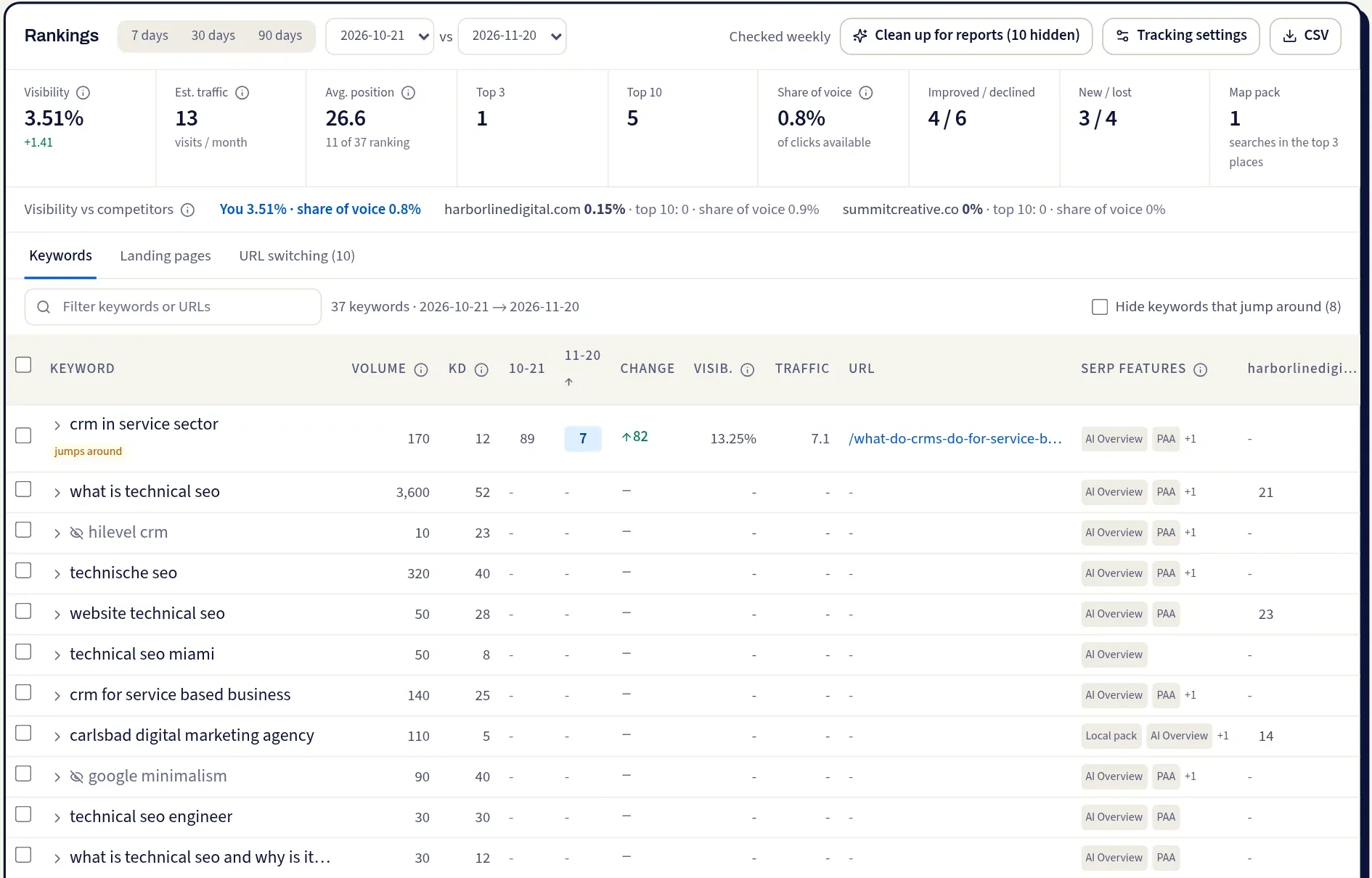 RankThat’s Rank Tracker: tracked keywords with their positions, the change between two dates and the page that ranked.
Step 3: Read the results correctly
A good weekly or monthly read goes in this order:
- Look at the overall picture first. How many keywords are in the top 3 and top 10, and is that rising or falling? In RankThat, a visibility trend over the last 12 weeks shows the share of possible clicks your tracked keywords get from their positions.
- Then the big movers. Which keywords gained or lost the most? Check whether they share a page, a tag or a competitor.
- Check which page ranks. If a keyword switches between two of your pages, that is usually keyword cannibalization. Rank Tracker lists keywords that switched ranking page in the period. Bean & Barrel found “espresso beans” flipping between a category page and a blog post, and fixed it by linking the post to the category and narrowing the post’s focus.
- Check features. Did you win or lose a featured snippet, local pack or image result? A drop from 1 to 2 that loses a snippet costs more clicks than a drop from 14 to 18.
- Compare with Search Console clicks. Rankings are a means. If rankings improve but clicks do not, check the title and description, and whether an AI Overview or other feature now sits above you.
Share of voice
Share of voice turns a list of positions into one number: the share of the clicks available across your tracked keywords that your positions would earn, compared with competitors. It weights each keyword by search volume and each position by how many clicks it usually gets, so position 1 on a big keyword counts far more than position 9 on a small one.
It is the best single number for “are we gaining on competitors?”, and the one we lead with in client reports. It is only as good as the keyword list behind it, so keep that list focused.
Step 4: Report rankings honestly
Ranking reports go wrong when they cherry-pick. A few rules we follow:
- Compare the same keywords over the same periods. Adding 50 easy keywords and announcing “more top 10 rankings” is not progress.
- Lead with what the business cares about. Calls, sales and clicks first, rankings as the explanation. See our monthly SEO report template.
- Leave out junk keywords. Misspellings, other cities you do not serve and competitor brand names clutter a report. RankThat’s Rank Tracker can keep these out of the client report table while still tracking them.
- Explain big moves. A core update, a new competitor, a page change. A number without a reason invites panic.
Rank tracking is one input. RankThat’s Search Performance view puts Search Console clicks beside it, so the two sources sit side by side.
Common mistakes
- Checking rankings by searching yourself. Personal history and location distort what you see.
- Treating Search Console average position as a ranking. It is an average of many different results pages.
- Tracking from the wrong location. A Columbus dentist tracked from “United States” sees national results that no patient ever sees.
- Reacting to one day’s drop. Wait for the next check before changing anything.
- Tracking everything. A focused list of 50 to 200 keywords beats a list of 3,000 nobody reads.
FAQ
How often should I check keyword rankings?
Weekly for most sites. Daily is useful during migrations, launches and algorithm updates, or for large stores. Checking more often than you can act on mostly adds noise.
Why is my Search Console position different from my rank tracker?
Search Console averages your topmost position across every real search where you appeared, from all locations and devices. A rank tracker checks one location and device at a set time. Both can be right at once.
Why do I see different rankings on my phone?
Results vary with location, device, language and your own search history. Your phone shows what Google picked for you at that spot. Use a tracker set to your customers’ location for a consistent view.
How many keywords should I track?
Enough to cover each important page’s main keyword, your money terms and a few near-wins. For a small local business that is often 30 to 100. Larger stores and agencies track more, grouped with tags.
Do rankings still matter with AI Overviews?
Yes, but less on their own. AI Overviews and other features can push organic results down, so watch clicks alongside positions. Tracking whether AI answers mention you is a separate job; see AI visibility.