
An AI assistant can only quote or link a page it has read. The AI crawlers tab of the AI Visibility page counts visits from the bots that OpenAI, Anthropic, Perplexity, Apple, Amazon and others send to websites, shows what each one is for, and lists the pages they read most. If ChatGPT never mentions you, this is where you check whether its bots reach the site at all.
Before you start
Bots don’t run JavaScript and don’t show up in Google Analytics, so the visits have to be counted where the site is served. One of these needs to be connected to the project:
- RankThat Bridge 1.15 or later on a WordPress site. See Install the WordPress Bridge plugin.
- The Cloudflare Worker, version 1.1 or later, on a site whose domain uses Cloudflare. See Fixes on sites without WordPress.
The script snippet can’t count bots, and neither can a Shopify store. Counting starts when the plugin or Worker is connected; earlier visits can’t be filled in.
Step 1: Open the AI crawlers tab
Go to AI SEO › AI Visibility and open the AI crawlers tab. Below its description you can switch between 7 days, 30 days and 90 days.
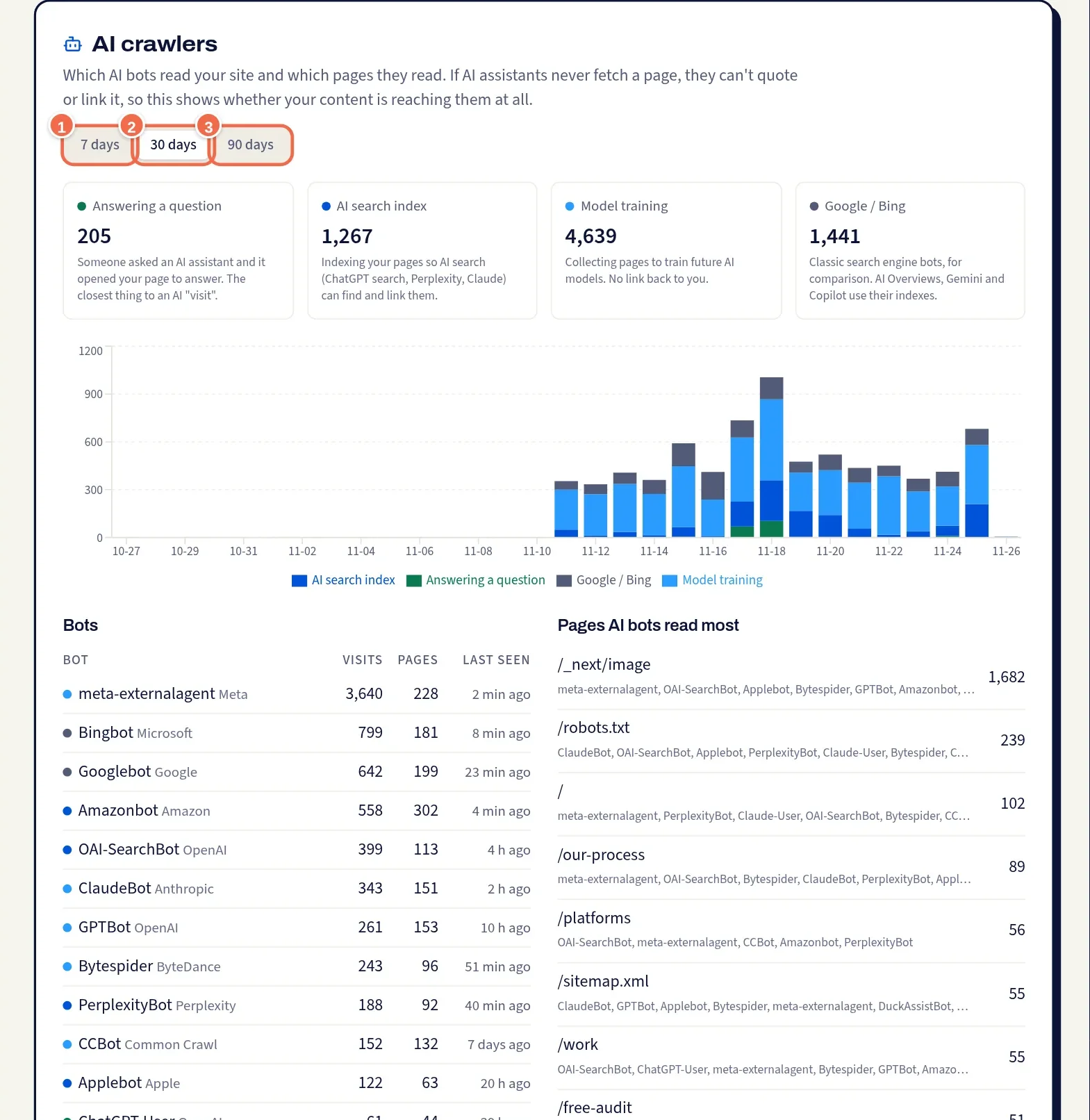 A site that is counting. 1 to 3: the period buttons. Below them, the visits by kind, a bar per day, each bot with its visits, pages and when it was last seen, and the pages AI bots read most. Until a plugin or Worker counts visits, the tab says Not counting yet and what to set up.
Step 2: Start counting
If the section says Not counting yet, the message tells you what is missing:
- No connection: connect the site with RankThat Bridge (WordPress) or the Cloudflare Worker in Project Settings, on the Connections tab.
- “This site runs RankThat Bridge” with an older version: version 1.15 counts AI crawlers. The plugin updates itself within a few minutes of a release, or update it under Plugins in WordPress.
- “Your Cloudflare Worker is version” below 1.1: copy the Worker again from Project Settings and paste it over the old one in Cloudflare.
- The JavaScript snippet: it can’t see bots. Use the Bridge plugin or the Worker instead.
Once one of them is counting, the section fills in as visits arrive.
Step 3: Read the four totals
Four boxes split the visits by what the bot is for:
- Answering a question: someone asked an assistant and it opened your page to answer (ChatGPT-User, Claude-User, Perplexity-User, DuckAssistBot, MistralAI-User). The closest thing to an AI “visit”.
- AI search index: bots that index pages so AI search can find and link them (OAI-SearchBot, Claude-SearchBot, PerplexityBot, Applebot, Amazonbot).
- Model training: bots collecting pages to train future models, with no link back (GPTBot, ClaudeBot, meta-externalagent, Bytespider, CCBot).
- Google / Bing: Googlebot and Bingbot, for comparison. Google’s AI Overviews and Gemini use Google’s index, and Copilot draws on Bing.
Below the boxes, a daily chart stacks the four kinds, so you can see a bot start or stop visiting.
Step 4: See which bots and which pages
Bots lists every bot seen in the period with its company, Visits, the number of different Pages it read and when it was Last seen. Hover a row for what that bot does.
Pages AI bots read most lists your pages by visits, with the bots that read each one. Check that your service pages, prices and FAQs are on it, not only the home page, tag pages or old blog posts.
What to do with it
- No AI crawler visits in the last 30 days: the section tells you to check that robots.txt doesn’t block GPTBot, OAI-SearchBot, ClaudeBot or PerplexityBot, and that your firewall lets them through. The site audit flags blocked AI crawlers as AI search crawlers are blocked, and you can fix it from there (see Fix audit issues).
- Training bots but no search or answer bots: the site can be read, but isn’t being used for answers yet. Track the questions customers ask (see Track the questions customers ask AI) and publish pages that answer them directly.
- Bots read pages you don’t care about: link your key pages from the home page and menus, and publish an llms.txt file that lists them.
- You’d rather not feed model training: you can block training bots like GPTBot or CCBot in robots.txt and still allow the search and answer bots. Decide per bot: blocking OAI-SearchBot or ChatGPT-User removes you from ChatGPT’s answers too.
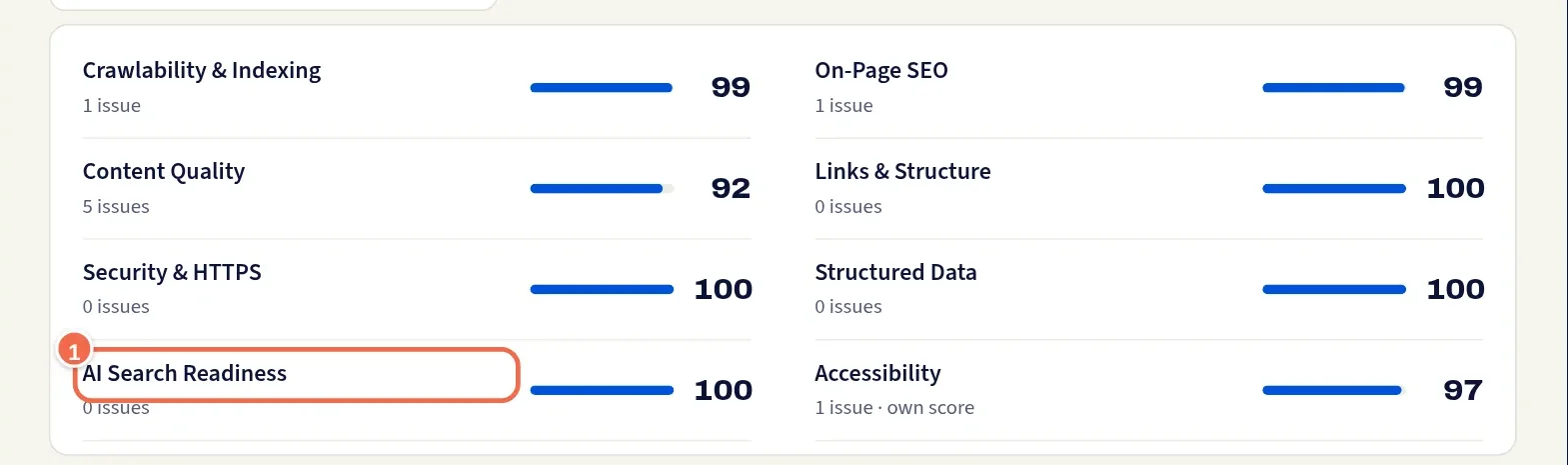 1: AI Search Readiness is one of the audit’s category scores. Under it, the site audit checks whether robots.txt lets AI crawlers in, whether the site has an llms.txt file and whether it has question-and-answer content.
FAQ
Are these numbers exact?
They are close, but a little low. Bots are recognized by the name they send, which anyone can fake, so the section counts bots that identify themselves. On WordPress, pages served from a page cache skip the plugin and aren’t counted, so real numbers can be higher.
Why are today’s visits missing?
The counts are sent to RankThat in batches rather than live, so the most recent visits can appear later.
Do I need this if I don’t use WordPress or Cloudflare?
The section needs one of the two to count. Without them, you can still check access: the site audit and the free AI crawler checker test your robots.txt for each AI bot.
For a step-by-step on robots.txt rules, read How to allow AI crawlers, or see the glossary entry on AI crawlers.