
More customers now ask ChatGPT, Google’s AI answers, Perplexity, Gemini or Claude who to hire instead of scrolling through search results. If the assistant names three competitors and not you, you never get the chance. The AI Visibility page shows how often these assistants mention and cite the business, gives it one score, lists what to fix so you get cited, and tracks the exact questions your customers ask.
Before you start
- Refreshing the citation sample (Step 5) is included in the Professional plan (4 times a month) and every Enterprise plan.
- Questions customers ask AI (Step 4) is on the Enterprise plans.
- The score is only complete with a site audit as well, because a quarter of it is the site’s AI readiness. If you haven’t run one yet, see Run a site audit.
Step 1: Open AI Visibility
Go to AI SEO › AI Visibility. The page has five tabs:
- Overview: the AI Visibility Score, what it rests on, and what to fix.
- Questions customers ask: the questions you track on each assistant, and Where AI gets its answers, the sites the assistants cite for them (once they have answers).
- Where you are cited: questions from a large sample of real AI conversations whose answers cite or mention the site.
- Competitors: who the AI answers name alongside or instead of the business.
- AI crawlers: which AI bots read the site.
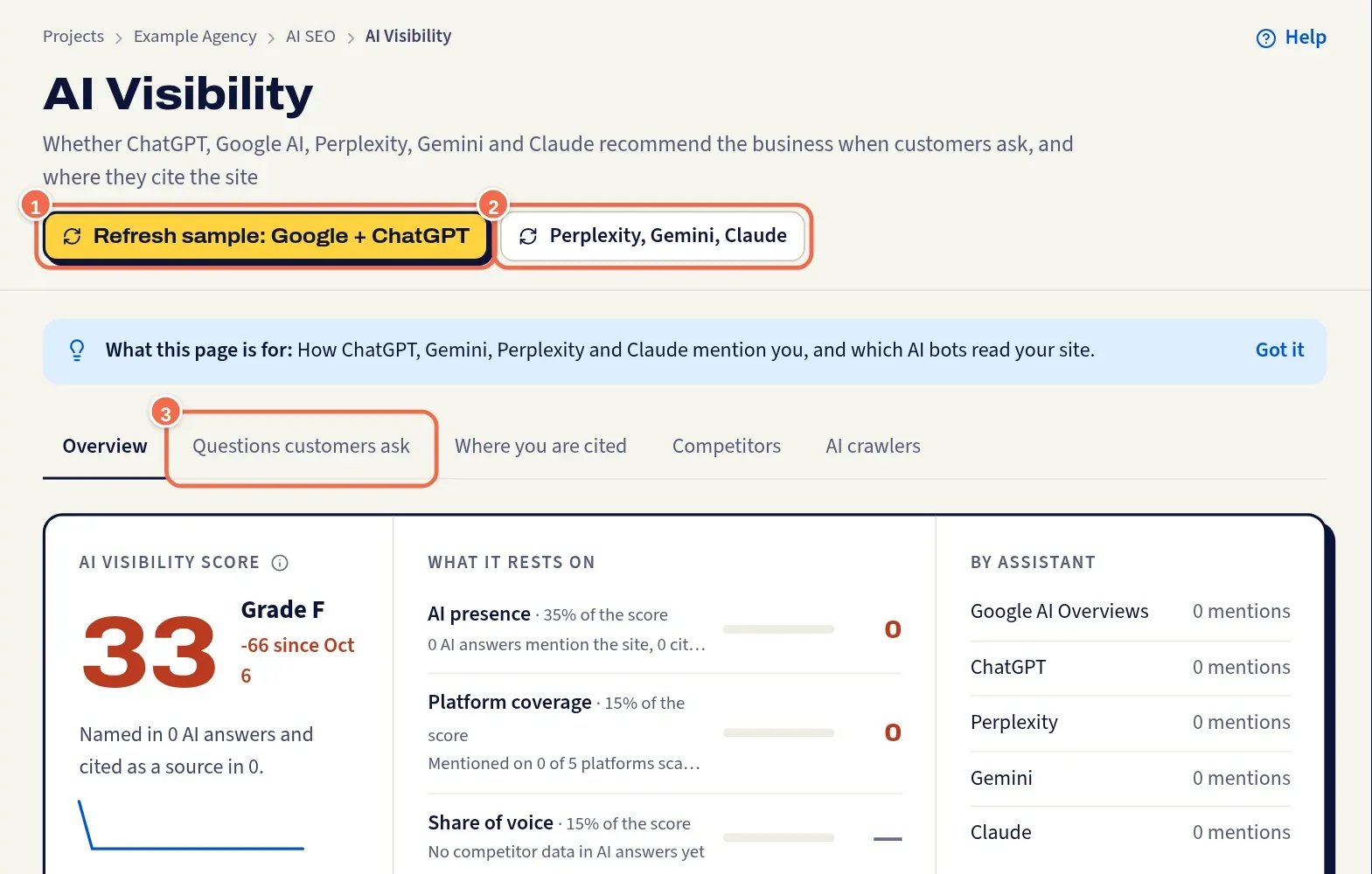 1: Refresh sample: Google + ChatGPT updates the citation sample from Google AI Overview and ChatGPT. 2: Perplexity, Gemini, Claude updates it from the other three. 3: Questions customers ask, one of the five tabs.
Step 2: Read the AI Visibility Score
On the Overview tab, the AI Visibility Score card gives a 0 to 100 score and a grade: A at 90 and above, B from 80, C from 70, D from 60, and F below. The small line under the grade shows how the score moved over time.
Under What it rests on, the score combines five parts, each shown with its weight and its own bar:
- AI presence (35%): how many AI answers mention or cite the site, on the latest scan of each assistant.
- AI readiness (25%): from the latest site audit, whether AI crawlers can reach the site, whether it has structured data and how easy it is to crawl.
- Platform coverage (15%): how many of the scanned assistants mention the site at all.
- Share of voice (15%): your mentions against the competitors that appear most.
- Sentiment (10%): how positive the mentions are.
Parts without data are left out and the rest are weighted up, so a new project still gets a score. Until both a scan and an audit exist, a note under the grade says which one is missing.
On the right, By assistant lists each assistant with its mentions and citations (or Not scanned), and Named alongside you names the sites that come up most in the same answers.
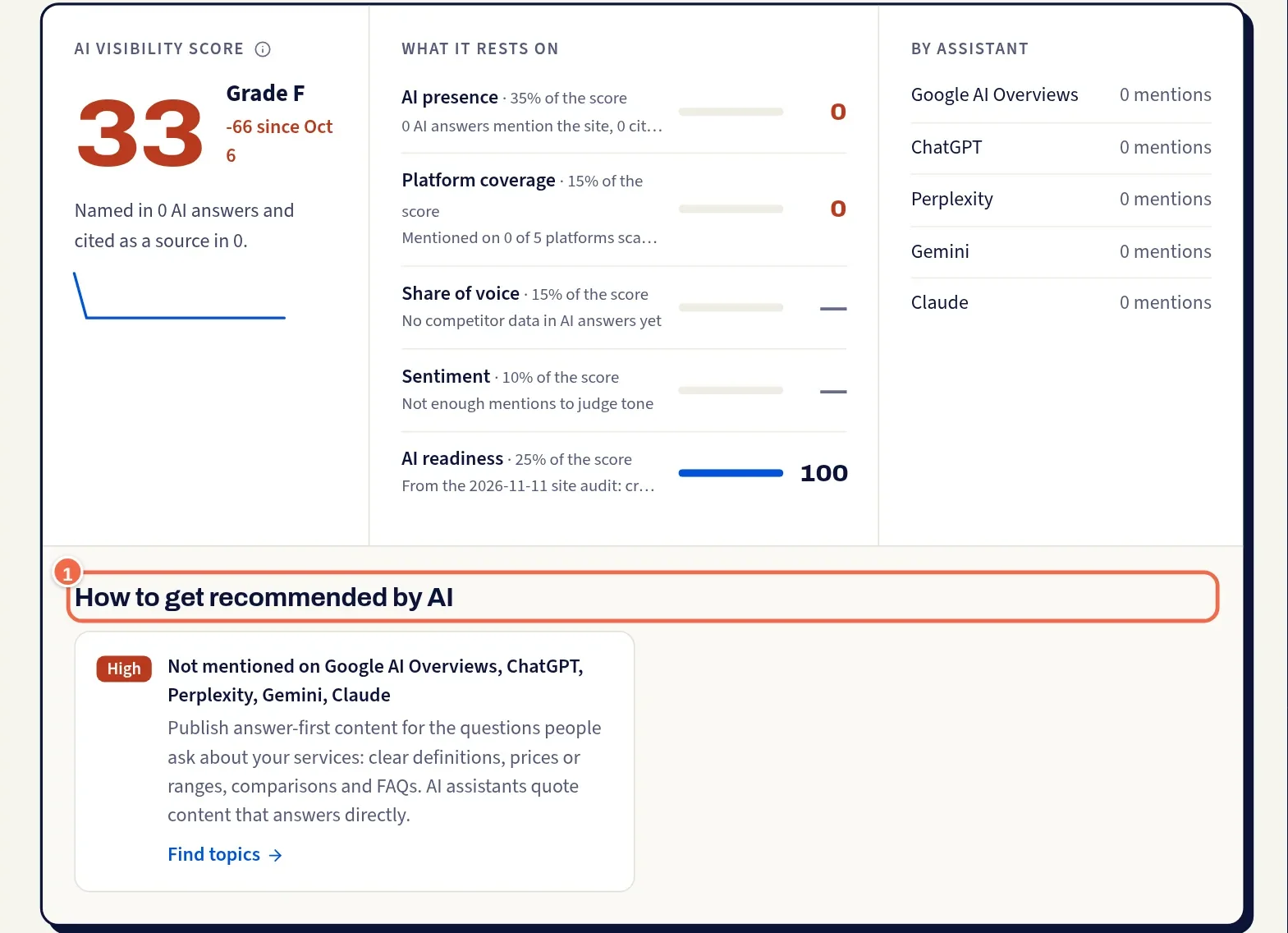 The five bars under What it rests on explain the score. 1: How to get recommended by AI lists the changes most likely to raise it.
Step 3: Fix what keeps assistants from citing you
Under How to get recommended by AI, each recommendation is marked High, Medium or Low impact. Common ones:
- Unblock AI search crawlers: robots.txt stops the bots behind ChatGPT, Perplexity or Claude from reading the site.
- Add Organization / LocalBusiness schema and Publish an llms.txt file: tell assistants exactly who the business is and what its key pages are.
- Not mentioned on some assistants: publish direct answers to the questions people ask about your services.
- Get cited, not just mentioned: add original data and expert quotes that assistants can link as a source.
Where you see Fix with AI, RankThat drafts the change from your latest site audit for you to review, the same way as fixing an audit issue (see Fix audit issues). Other recommendations link to the page where you act on them, such as Find topics.
Step 4: Track the questions your customers ask
The Questions customers ask tab checks real customer questions, such as “who is the best roofer in Austin?”, on Google AI Mode, ChatGPT, Perplexity, Gemini and Claude. For each answer it records whether the business is named and whether its site is cited as a source.
The first time you open the tab, RankThat writes about ten questions from the business, its area and its keywords. Remove any that don’t fit with the X, then click Track these 10 and check now (the number matches the list) to add them and ask the assistants straight away. Results arrive in a few minutes. You can also type your own question (with an optional city) and click Add, or click Suggest prompts for more ideas.
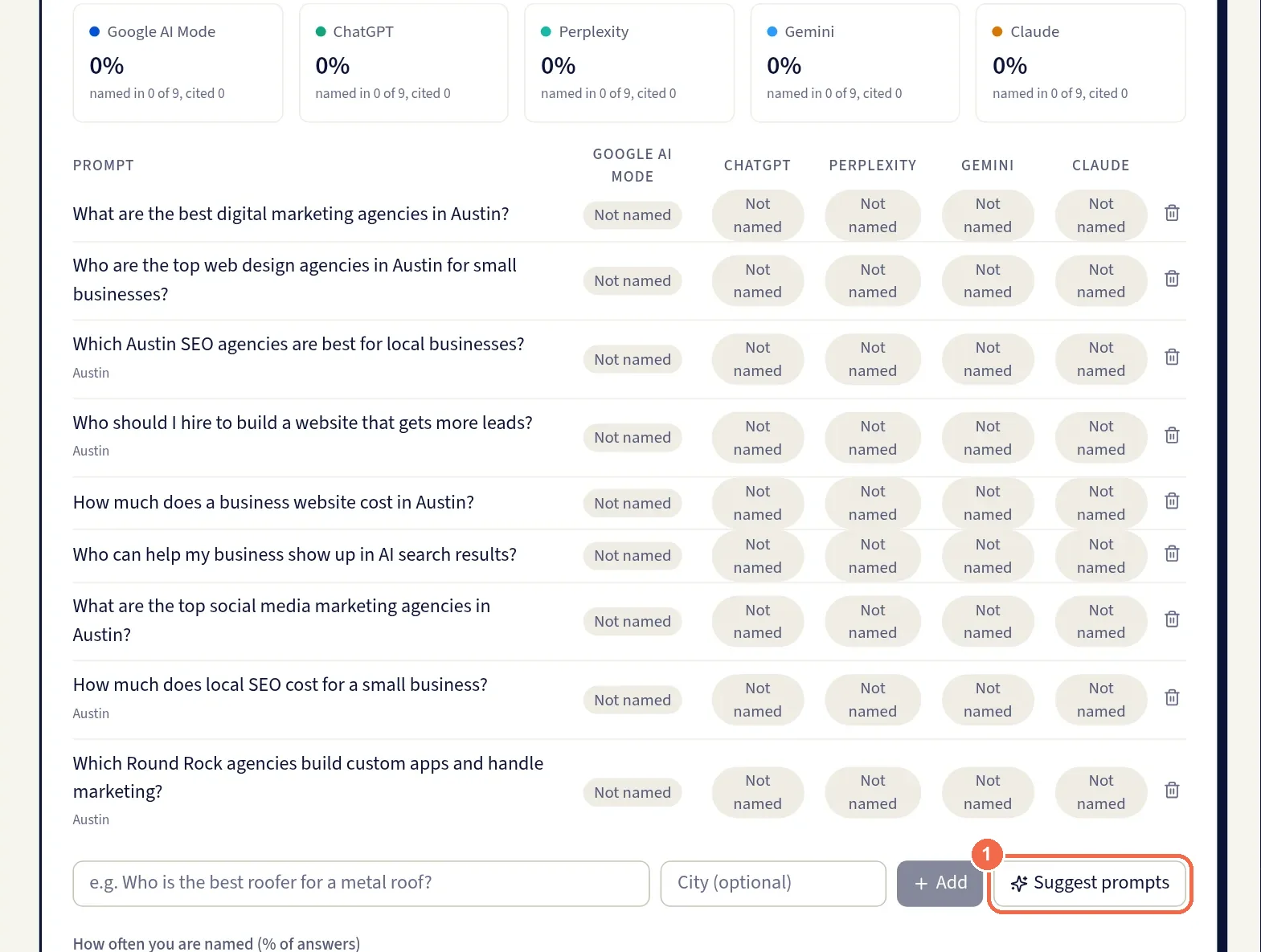 Each tracked question with what every assistant answered. Type your own question and a city in the boxes below the list and click Add. 1: Suggest prompts writes more ideas.
Set the schedule menu to Every week to keep it current, and click Check now to ask the assistants again. This is the most reliable measure on the page, because it uses the questions your customers really ask, so it gets its own article in this section.
Step 5: Refresh the citation sample
The Where you are cited tab comes from a large sample of questions people asked AI assistants, filtered to the answers that cite or mention the site. It shows citations that already happen, but the questions are not chosen by you, so they can look random.
To update it, click Refresh sample: Google + ChatGPT at the top of the page, or Perplexity, Gemini, Claude for the other three assistants. Each assistant can be refreshed once every 7 days. On the 1st of every month RankThat also refreshes Google AI Overviews and ChatGPT by itself, so the monthly report has current numbers.
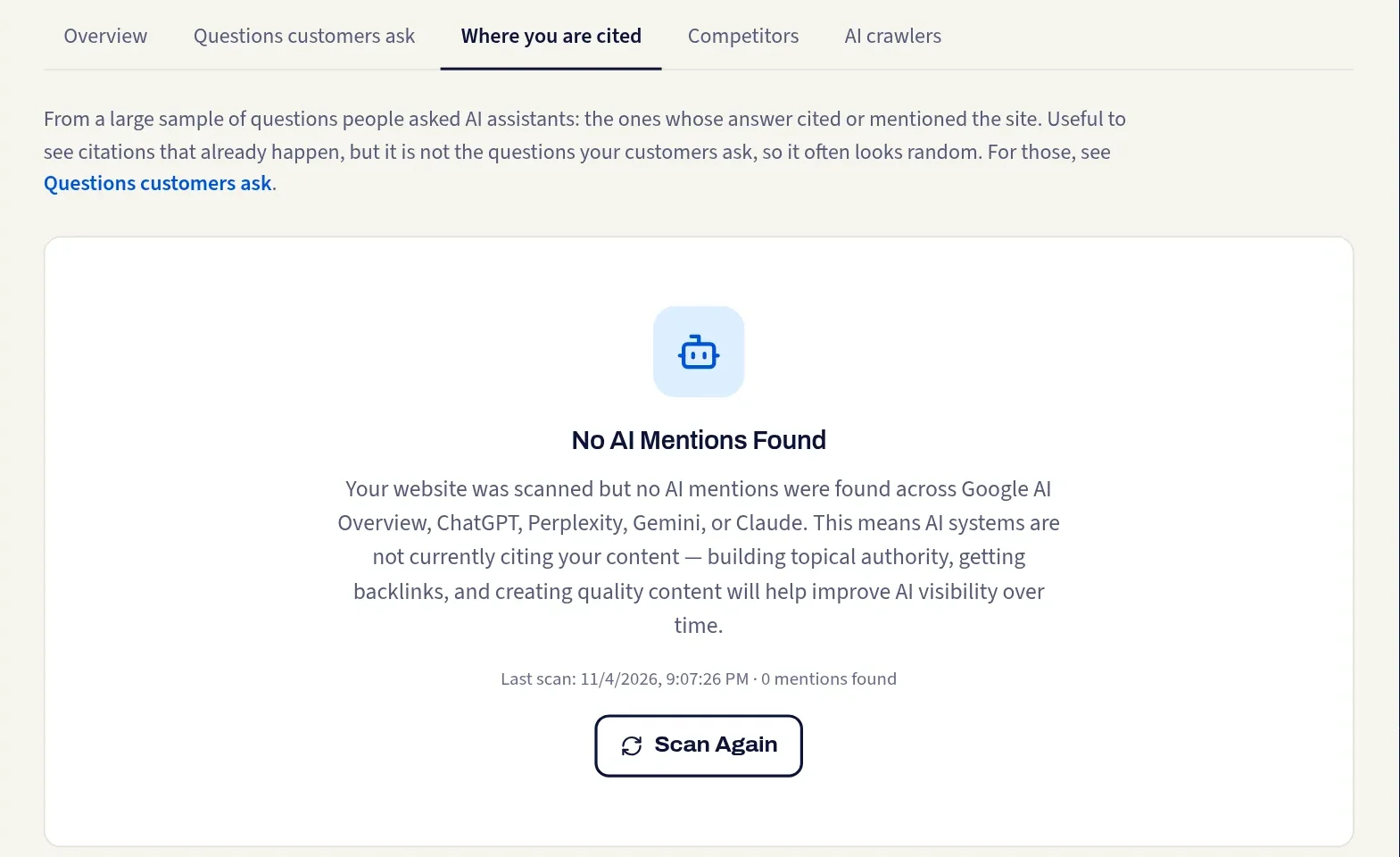 Until the sample finds an answer that names or cites the site, the tab shows No AI Mentions Found with the date of the last scan, and the sample’s own views don’t appear.
Step 6: Read the sample
Once the sample has mentions, Where you are cited has four views:
- Summary: AI answers naming the site, Cited as a source (with the share that link to the site), AI search volume and Average citation position, plus the answers naming the site over time.
- Keywords: the questions where the site appears, with AI search volume and mentions.
- Cited pages: which of your pages the assistants cite, and how often.
- Answers: every answer in the sample, searchable. Click a row to see the question, your cited page, an excerpt of the answer and the other brands it named.
The Competitors tab lists the sites the AI answers name most, compared with you.
Reading the results
- Mentioned but rarely cited: assistants know the brand but don’t link to the site. Add pages with clear facts, prices or ranges, and FAQs they can quote.
- Strong on one assistant, absent on others: check the AI crawlers tab. A bot that never reads the site can’t cite it.
- One competitor in every answer: open their cited pages from the Competitors tab and cover the same questions better.
Troubleshooting
“This platform was scanned N days ago”
Each assistant’s sample can be refreshed once every 7 days. Wait for the date shown, or use the other button to refresh the other assistants.
“No AI Mentions Found”
The scan ran, but the sample has no answers that cite or mention the site yet. That is common for smaller local businesses. Use Questions customers ask AI to measure the questions that matter to you instead, and work through the recommendations.
The score says “Not enough data”
Run a site audit and refresh the sample once. The score fills in as soon as either exists.
Questions customers ask AI shows a lock
Prompt tracking is on the Enterprise plans. See Enterprise plans on the card opens Billing.
For the background on how assistants pick sources, read How to get recommended by ChatGPT and the glossary entry on AI visibility, or check your robots.txt with the free AI crawler checker.