
Clients ask “how strong is our site compared with theirs?” and want one number. The Authority Score is RankThat’s answer: a 0 to 100 measure of a site’s strength in Google, built from the quality of the sites linking to it, how many different sites link to it, and how much organic traffic it gets. It plays the same role as Ahrefs’ Domain Rating or Moz’s Domain Authority, though each tool calculates its own number, so the figures won’t match.
How the score is calculated
Three inputs, weighted:
- Link strength (50%): how strong the linking profile is, on a 0 to 1000 scale. This is the same “Link strength” you see on the Backlinks page.
- Referring domains (30%): how many different sites link to you, on a log scale that reaches its maximum at 100,000 sites.
- Organic traffic (20%): estimated monthly visits from Google, on a log scale that reaches its maximum at 10 million a month.
Because two of the three use a log scale, going from 10 to 100 referring domains moves the score about as much as going from 1,000 to 10,000. Small sites can make real progress, and big sites move slowly.
The same formula is used everywhere in RankThat, so your client’s score and a competitor’s score checked in the Domain Explorer can be compared directly.
Before you start
The score appears after the project’s first backlink check. RankThat checks backlinks for every project on the 1st and 15th of each month, or you can click Refresh on Backlinks › Backlinks & Audit (Professional and Enterprise plans). See Check your backlinks.
Step 1: Find the score on the dashboard
Open the project’s Dashboard (Overview › Dashboard) and find the Authority Score card. It shows:
- The score out of 100, and how much it moved since the previous month.
- Checked and the date of the backlink check it comes from.
- A small line of the score month by month, for up to the last 12 months.
- The three inputs: Link strength (out of 1000), Referring domains and Organic traffic per month.
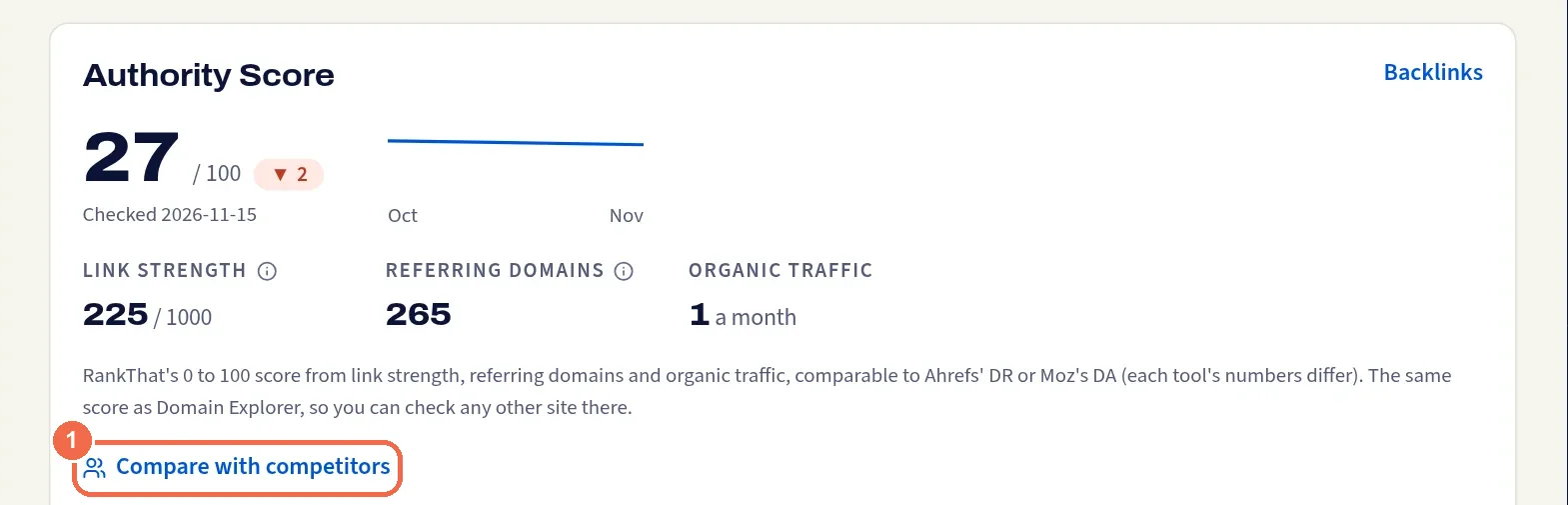 The score, its monthly trend and the three numbers it is built from. 1: Compare with competitors puts it next to your saved competitors.
If the card says the score appears after the first backlink check, no check has run yet for this project.
Step 2: Compare with competitors
Click Compare with competitors on the card. RankThat looks up the site and the competitors saved on the Competitors page, and shows a table with each site’s Authority, Ref. domains and Traffic. Your site is in bold and marked “(you)”.
If no competitors are saved, the card says so and links to the Competitors page. Add your three to five closest rivals there first (see Add competitors and find content gaps).
How to read it:
- You are 10 or more points behind the sites that outrank you: links are likely part of the gap. Look at who links to them.
- Your score is similar but they still outrank you: the difference is more likely in content, relevance or local signals than in authority.
- You are ahead: protect it. Watch for lost links from strong sites on the New & Lost tab.
Step 3: Check any other site
To score a site you don’t track, open the Domain Explorer from the main menu and enter its domain. The Overview shows its Authority Score with the backlink and traffic numbers behind it.
To compare many sites at once (for example every agency or contractor in a city), use the Bulk Compare tab: paste up to 200 domains, one per line, and get each one’s authority, linking domains and Google traffic side by side, with a CSV download.
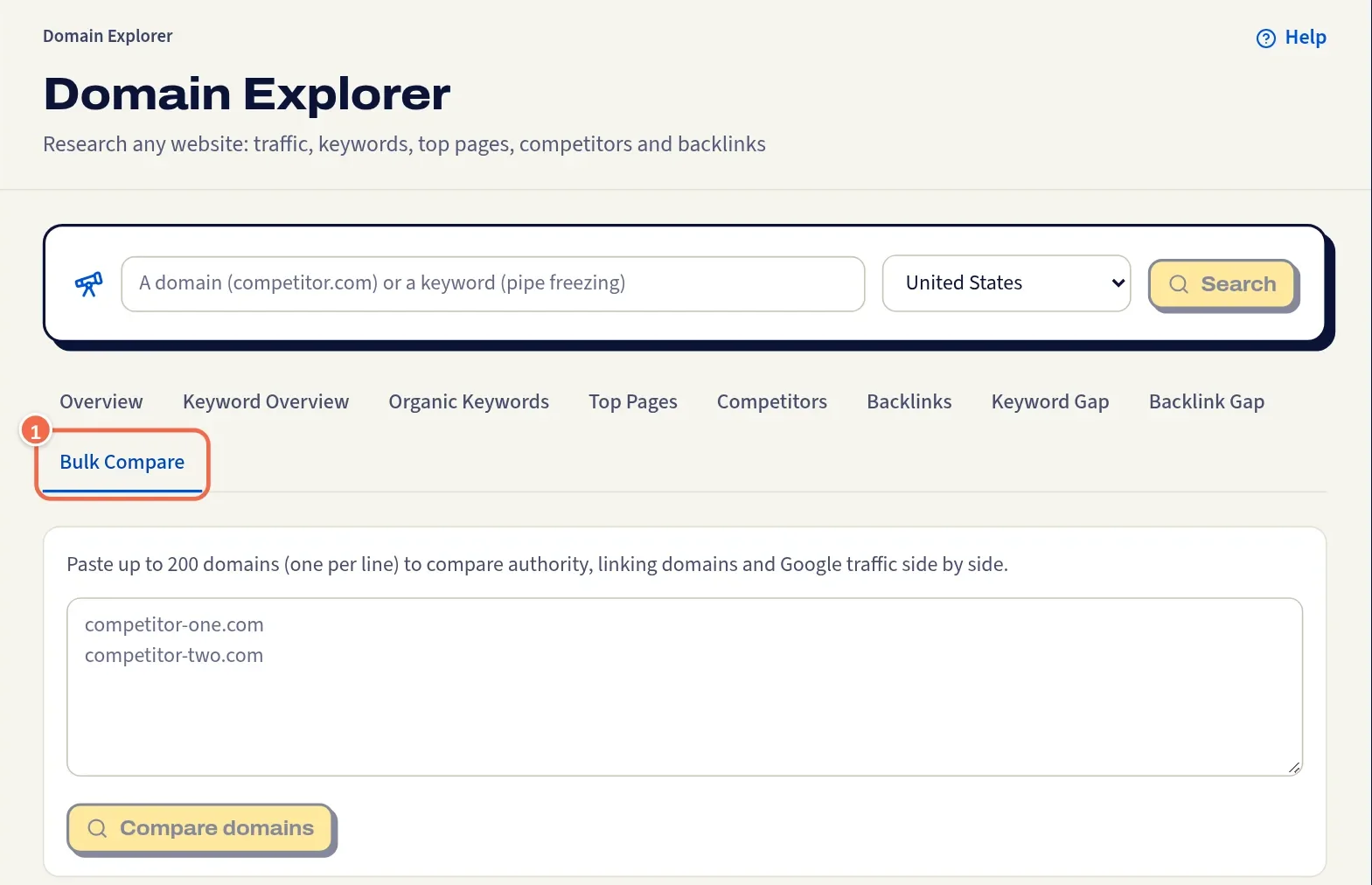 1: Bulk Compare scores up to 200 domains side by side, with a CSV download.
The Domain Explorer is covered step by step in Research any site with the Domain Explorer.
Step 4: See where it comes from
The score’s inputs come from the backlink checks. On Backlinks › Backlinks & Audit, the Referring domains card and the Backlinks over time chart show the referring domains behind the score, and each linking site’s Link strength is in the tables.
 The second card, Referring domains, is the number of different sites linking to you, 30% of the Authority Score.
What moves the score
- Links from strong, relevant sites raise link strength, the biggest part. One link from a respected local newspaper or industry association is worth more than dozens from directories.
- More different sites linking to you raise the referring domains part. Ten links from ten sites beat ten links from one.
- More organic traffic raises the last part. Better rankings feed back into the score.
- Lost links pull it down. A drop after a redesign often means old pages with links now return errors: redirect them.
Disavowing toxic links doesn’t change the Authority Score directly; it changes the toxic score on the Backlink Audit tab.
FAQ
Why is my score different from Ahrefs or Moz?
Each tool uses its own link data and its own formula. Compare scores within one tool, not across tools.
Why didn’t the score change after I got new links?
The score updates from the backlink checks on the 1st and 15th, and the change shown is month on month. New links also take time to be discovered.
Is a higher score a guarantee of better rankings?
No. It is a guide to how strong a site is overall. Rankings still depend on the page, the search and, for local searches, distance and reviews.
The score also appears in the monthly client report, so clients see it every month. For the background, see the glossary entries on domain authority and referring domains.